
andrewdraws
Inspiring
April 13, 2020
Answered

Window resizes when I open a new file

  • April 13, 2020
  • 4 replies
  • 2119 views

Hi there!  This seems like an easy fix. If I open a new PSD file, the main PSD window resizes to the size of the new document. I like to work with the window pulled all the way out to cover the screen. How do I prevent the window from resizing?  Thanks!
Correct answer jane-e

Hi Andrew,

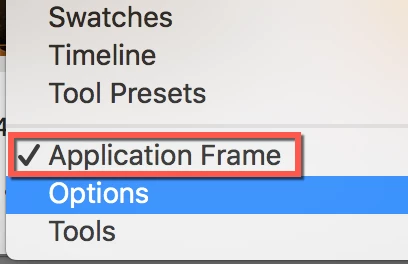
If you are on a Mac, you may be talking about the Application Frame, found in the Window menu. If that's not it, we may need a screen shot.

~ Jane

4 replies

Jeff Arola
Community Expert
Community Expert
February 4, 2022

The behavior that the op and the post over at photoshop.com describe should be fixed in both photoshop 2022 (23.1.1) and photoshop 2021 (22.5.5).


If you have different results please post a screencast or screenshots to show what your referring to.


Jeff Arola
Community Expert
Community Expert
April 14, 2020

That's actually a bug in photoshop when using Floating Document Windows.


https://feedback.photoshop.com/photoshop_family/topics/ffhjfghfgh

Participating Frequently
February 4, 2022

NOT solved, unless you want to use Application Frame. It's a bug that happens to people who don't want to use Application Frame (usually because of the monitor space it covers), so 'use Application Frame' is not a good solution for us.

For those needing a screenshot, see Jeff Arola's comment, or just go to
https://feedback.photoshop.com/photoshop_family/topics/ffhjfghfgh

Adobe still hasn't addressed it.

jane-e
Community Expert
jane-eCommunity ExpertCorrect answer
Community Expert
April 13, 2020

Hi Andrew,

If you are on a Mac, you may be talking about the Application Frame, found in the Window menu. If that's not it, we may need a screen shot.

~ Jane

andrewdraws
Inspiring
April 13, 2020

That's it! ... Thanks so much, Jane-e  !!

JJMack
Community Expert
Community Expert
April 13, 2020

You can not open a new PSD file.  Photoshop is a Document ediror not a file editor.  You can open a new document you can savs a PSD file from.  You can open an old PSD file into a Photoshop Document. 


Now if you want the documents you open New and old  alike to fited to the display.  You can setup  Open and New document event handlers in the Script Event Manager to play an action or run a script that  does view fit on screen Shortcut Ctrl+0 or  view 100% Ctrl+1

JJMack
andrewdraws
Inspiring
April 13, 2020

Ok ... symantics. Thanks for the reply, but you know what I mean. If I open an existing PSD file, in Photoshop, and I already have a PSD file open... then the window changes to the dimensions of the new file. Can this be fixed?

JJMack
Community Expert
Community Expert
April 14, 2020

Look like your on a mac Window users can not remove or turn off an application window frame.  I use windows the platform differences.

JJMack