
Participant
March 22, 2024
Answered

Workspace tiles not moving

  • March 22, 2024
  • 1 reply
  • 257 views

Hi all, 

I am experiencing a problem when I am trying to adjust my workspace this morning. My workspace arrangement changed unexpectedly and since then Photoshop won't let me move the tiles/tabs on the workspace to adjust it to my needs. 

For example I would select "Photography" Workspace and History is on the same group as Actions; I then try to drag and drop the Actions on separate space in order to be able to view both and it won't let. The only thing it allowes me to do is swap between the ones that are arranged originally in a group. 

I restarted Photoshop, I signed off Adobe and sign in again, restarted the computer, uninstalled Adobe creative cloud and all apps and re-installed everything but nothing has changed unfortuanately. 


Please help! Been working on a specific set up for years, this is making me so much slower! 

Thanks,
Dimitra.
This topic has been closed for replies.
Correct answer Ged_Traynor

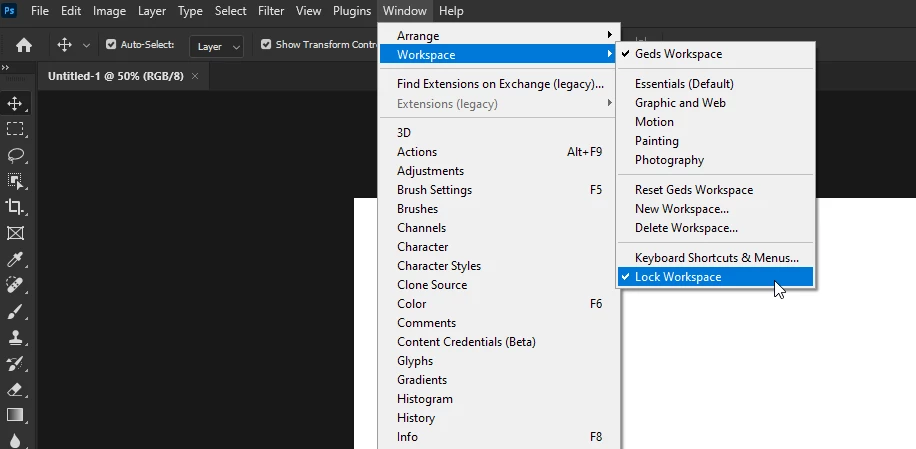
@DimitraGKM do you have Lock Workspace enabled by any chance

If it's not that, try manually resetting your Photoshop preferences
https://helpx.adobe.com/ie/photoshop/using/preferences.html#Manually
Remember to back up your settings before doing the preference reset
https://helpx.adobe.com/ie/photoshop/using/preset-migration.html

1 reply

Ged_Traynor
Community Expert
Ged_TraynorCommunity ExpertCorrect answer
Community Expert
March 22, 2024

@DimitraGKM do you have Lock Workspace enabled by any chance

If it's not that, try manually resetting your Photoshop preferences
https://helpx.adobe.com/ie/photoshop/using/preferences.html#Manually
Remember to back up your settings before doing the preference reset
https://helpx.adobe.com/ie/photoshop/using/preset-migration.html

Participant
March 22, 2024

OMG Thank you so much !!! I had locked it! I knew I had done something silly that I couldn't spot! Thanks so much for your immediate responce ! 

Ged_Traynor
Community Expert
Community Expert
March 22, 2024

You're welcome 🙂