brooksjordan!
Participant
August 13, 2019
Question

Would love your approach for removing backgrounds for images with undefined edges

  • August 13, 2019
  • 6 replies
  • 1048 views

Hi, I’m good with Photoshop but no expert.

My question is:

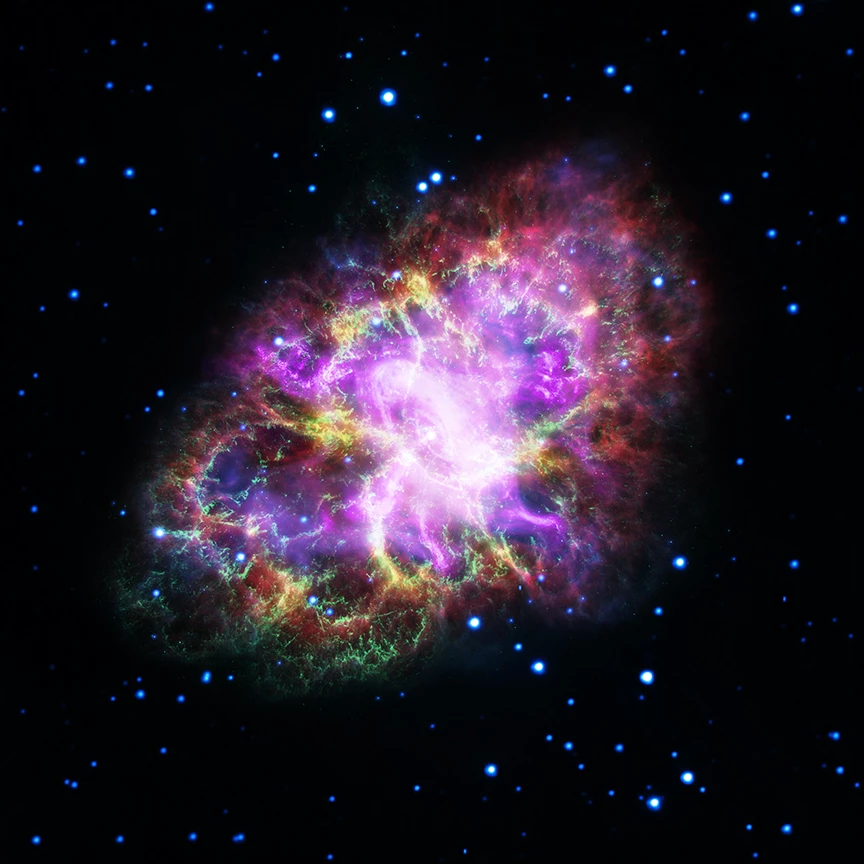
What are good approaches to removing the background from an image like the one below that has such diffuse, undefined edges?

I want to literally lift that nebula in the foreground off that black background of space.

I’ve learned quite a few techniques for removing backgrounds in the last several weeks so I‘m not starting from scratch, but so far I haven’t been able to get a *great* result for the image below.

Any suggestions on techniques appreciated.
    This topic has been closed for replies.

    6 replies

    Stephen Marsh
    Community Expert
    Community Expert
    August 14, 2019

    If compositing in Photoshop, using a lower layer image in screen blend mode will drop out the black background, then an upper layer image in normal blend with a hand painted layer mask, blend if etc.

    Nancy OShea
    Community Expert
    Community Expert
    August 14, 2019

    Depending on the image, you may need a combination of techniques to get exactly what you want.   Use Ctrl+J to copy your layer and experiment with various approaches. 

    Nancy O'Shea— Product User & Community Expert
    zenginejulia
    Participating Frequently
    August 14, 2019

    You can also try the background eraser tool.

    I made a little overview tutorial for it:

    photoshop_background_eraser_tool___tutorial_by_zenjulia_d92wg9t-pre.jpg?token=eyJ0eXAiOiJKV1QiLCJhbGciOiJIUzI1NiJ9.eyJzdWIiOiJ1cm46YXBwOjdlMGQxODg5ODIyNjQzNzNhNWYwZDQxNWVhMGQyNmUwIiwiaXNzIjoidXJuOmFwcDo3ZTBkMTg4OTgyMjY0MzczYTVmMGQ0MTVlYTBkMjZlMCIsIm9iaiI6W1t7ImhlaWdodCI6Ijw9MTEyNyIsInBhdGgiOiJcL2ZcL2Y0NzQ2ZDk1LWZiNTktNGM1NS05MWUxLWI0M2FjNTE2MDlmMFwvZDkyd2c5dC1kZjljNzQzYi0yNjExLTRkM2UtODcxNy1lNTBkOWVhM2EwNDAuanBnIiwid2lkdGgiOiI8PTIyNjgifV1dLCJhdWQiOlsidXJuOnNlcnZpY2U6aW1hZ2Uub3BlcmF0aW9ucyJdfQ.iwPcbmBucwMPY2_5XQW_wnT-jvEZKqj8TpMcInc7C1c

    Simmer1
    Community Expert
    Community Expert
    August 13, 2019

    Hi,

    You could also try a Colour range selection:

    Go Select> Color Range

    Be sure to check the Invert button and Adjust the Fuzziness slider accordingly and click ok.

    Next check the Add Layer Mask button at the bottom of your Layers Palette and this will create a Mask:

    I hope this helps

    davidc69929907
    Inspiring
    August 13, 2019

    Both of the provided solutions are great options, but I will +1 for Color Range, because the mask can be further tweaked and you can make a lot more detailed decisions with this tool.

    brooksjordan!
    Participant
    August 13, 2019

    Hi David.

    Great, thanks for the +1.

    Can you can give me an example of a tweak or detail that would lift this nebula off the black background more accurately?

    Specifically, one of the issues I’ve been having is not just finding the primary edge, but the “mist” just beyond that primary edge.

    That “mist” is in a sense part nebula, part black space. I don’t need to capture that mist perfectly, but I’d like to maintain the softness of the edge overall.

    Do I need to create a custom brush to do that?

    Nancy OShea
    Community Expert
    Community Expert
    August 13, 2019
    Nancy O'Shea— Product User & Community Expert
    Nancy OShea
    Community Expert
    Community Expert
    August 13, 2019

    Use Blend If.

    1. Double click the background layer and move the dark slider to the right until you see a checkerboard pattern. which denotes transparency.
    2. To add another stop, hold Alt + Click.  See screenshot.
    3. When you're satisfied with background removal, hit OK button (top, right).

    Nancy O'Shea— Product User & Community Expert
    brooksjordan!
    Participant
    August 13, 2019

    Thanks Nancy. I’ll try it.

    What is the value of adding another stop?

    Nancy OShea
    Community Expert
    Community Expert
    August 13, 2019

    The extra stop gives you more control over how much background vs foreground is removed.

    Nancy O'Shea— Product User & Community Expert