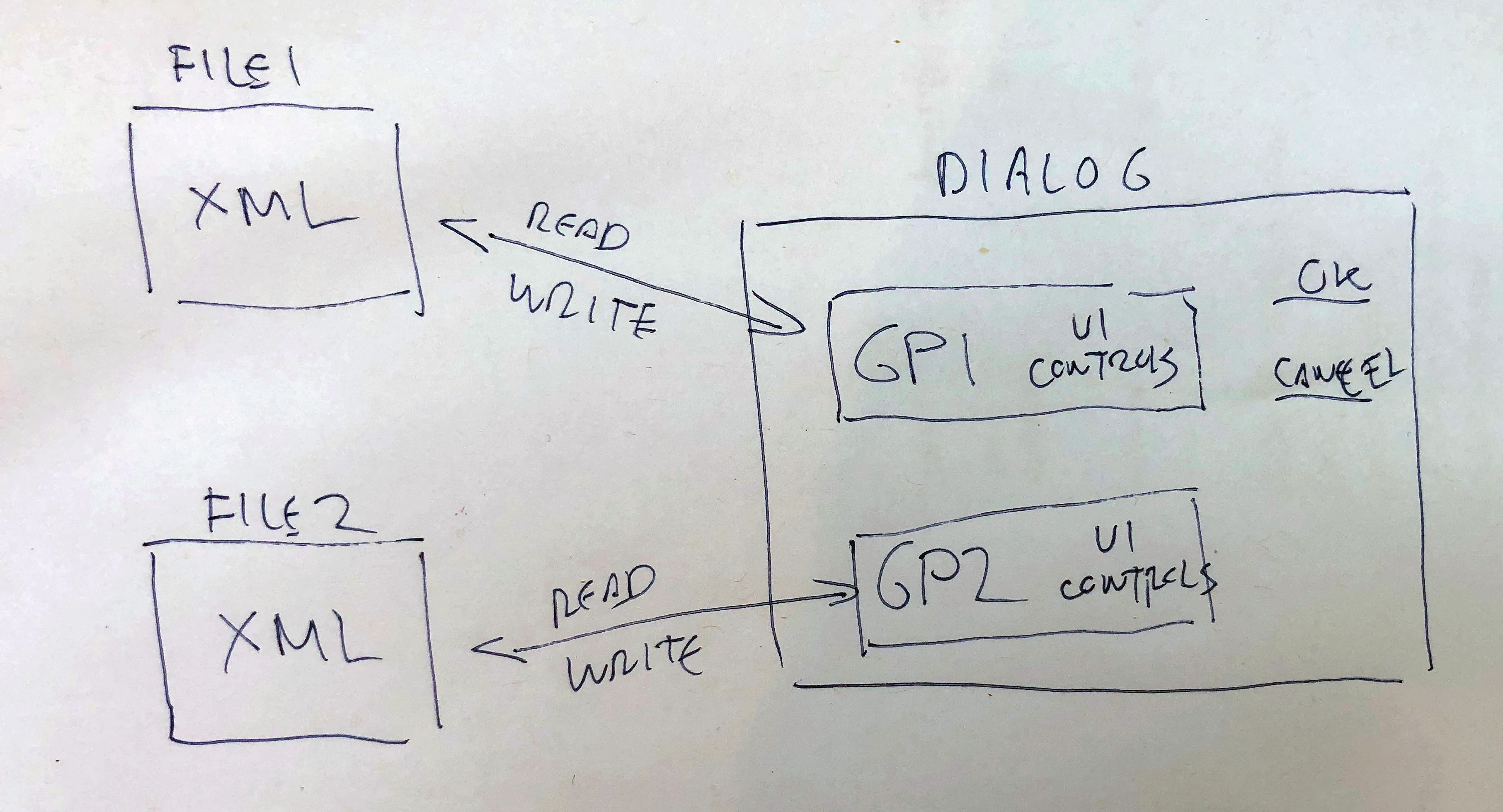
Why not? Just write a function to save the settings in XML and specify file to read/write. In this function, you also need to pass the settings that you want to save / read. You can do this with function arguments, with arrays or objects - here you are only limited by your imagination.
var dlItems = ["Item 1", "Item 2", "Item 3"],
    d = new Window("dialog{text:'Dialog', orientation:'row',alignChildren:['center','top']}"),
    mainGroup = d.add("group{orientation:'column',alignChildren:['left','center']}"),
    pn1 = mainGroup.add("panel{text:'Panel 1',orientation:'column',alignChildren:['fill', 'top']}"),
    et1 = pn1.add("edittext{text:'EditText'}"),
    div1 = pn1.add("panel{alignment:'fill'}"),
    g1 = pn1.add("group{orientation:'row',alignChildren:['left', 'center']}"),
    ch1 = g1.add("checkbox{text:'Checkbox 1'}"),
    ch2 = g1.add("checkbox{text:'Checkbox 2', value:true}"),
    ch3 = g1.add("checkbox{text:'Checkbox 3'}"),
    g2 = pn1.add("group{orientation:'row', alignChildren:['left', 'center']}"),
    rb1 = g2.add("radiobutton{text:'RadioButton 1'}"),
    rb3 = g2.add("radiobutton{text:'RadioButton 2'}"),
    rb2 = g2.add("radiobutton{text:'RadioButton 3', value:true}"),
    dl1 = pn1.add("dropdownlist", undefined, undefined, { items: dlItems }),

    pn2 = mainGroup.add("panel{text:'Panel 1',orientation:'column',alignChildren:['fill', 'top']}"),
    et2 = pn2.add("edittext{text:'EditText'}"),
    div2 = pn2.add("panel{alignment:'fill'}"),
    g3 = pn2.add("group{orientation:'row',alignChildren:['left', 'center']}"),
    ch4 = g3.add("checkbox{text:'Checkbox 1', value:true}"),
    ch5 = g3.add("checkbox{text:'Checkbox 2'}"),
    ch6 = g3.add("checkbox{text:'Checkbox 3'}"),
    g4 = pn2.add("group{orientation:'row', alignChildren:['left', 'center']}"),
    rb4 = g4.add("radiobutton{text:'RadioButton 1'}"),
    rb5 = g4.add("radiobutton{text:'RadioButton 2', value:true}"),
    rb6 = g4.add("radiobutton{text:'RadioButton 3'}"),
    dl2 = pn2.add("dropdownlist", undefined, undefined, { items: dlItems }),

    grBn = d.add("group{orientation:'column',alignChildren:['fill', 'top']}"),
    ok = grBn.add("button", undefined, "Ok", { name: "ok" }),
    cancel = grBn.add("button", undefined, "Cancel", { name: "cancel" }),

    settingsItems1 = { textItem: et1, checkBoxOne: ch1, checkBoxTwo: ch2, checkBoxThree: ch3, radiobuttonOne: rb1, radiobuttonTwo: rb2, radiobuttonThree: rb2, dropdown: dl1 },
    settingsItems2 = { textItem: et2, checkBoxOne: ch4, checkBoxTwo: ch5, checkBoxThree: ch6, radiobuttonOne: rb4, radiobuttonTwo: rb5, radiobuttonThree: rb6, dropdown: dl2 };

ok.onClick = function () {
    d.close()
    saveToXML(settingsItems1, 'settings file one')
    saveToXML(settingsItems2, 'settings file two')
}

d.onShow = function () {
    readFromXML(settingsItems1, 'settings file one')
    readFromXML(settingsItems2, 'settings file two')
}
d.show();

function saveToXML(o, xmlName) {
    var f = new File(Folder.desktop + '/' + xmlName + '.xml'),
        myXML = new XML('<variables></variables>');
    for (var a in o) {
        switch (o[a].type) {
            case 'edittext': myXML[a] = o[a].text; break;
            case 'checkbox': myXML[a] = o[a].value; break;
            case 'radiobutton': myXML[a] = o[a].value; break;
            case 'dropdownlist': myXML[a] = o[a].selection ? o[a].selection.text : ''; break;
        }
    }
    f.encoding = "UTF8"
    f.open('w');
    f.write(myXML.toXMLString())
    f.close();
}

function readFromXML(o, xmlName) {
    var f = new File(Folder.desktop + '/' + xmlName + '.xml');
    f.encoding = "UTF8";
    f.open('r');
    var myXML = new XML(f.read());
    f.close();

    for (var a in o) {
        switch (o[a].type) {
            case 'edittext': o[a].text = myXML[a] != '' ? myXML[a] : o[a].text; break;
            case 'checkbox': o[a].value = myXML[a] != '' ? (myXML[a] == 'true' ? 1 : 0) : o[a].value; break;
            case 'radiobutton': o[a].value = myXML[a] != '' ? (myXML[a] == 'true' ? 1 : 0) : o[a].value; break;
            case 'dropdownlist': o[a].selection = myXML[a] != '' ? o[a].find(myXML[a]) : 0; break;
        }
    }
    f.encoding = "UTF8"
    f.open('w');
    f.write(myXML.toXMLString())
    f.close();
}
UPD: When receiving parameters from an XML file, do not forget that you are receiving string values. If you want to store numbers, boolean values - do not forget to convert the data type when reading.
 AdChoices