Participant
July 30, 2024
Question

Combine pictures
  • July 30, 2024
  • 1 reply
  • 472 views

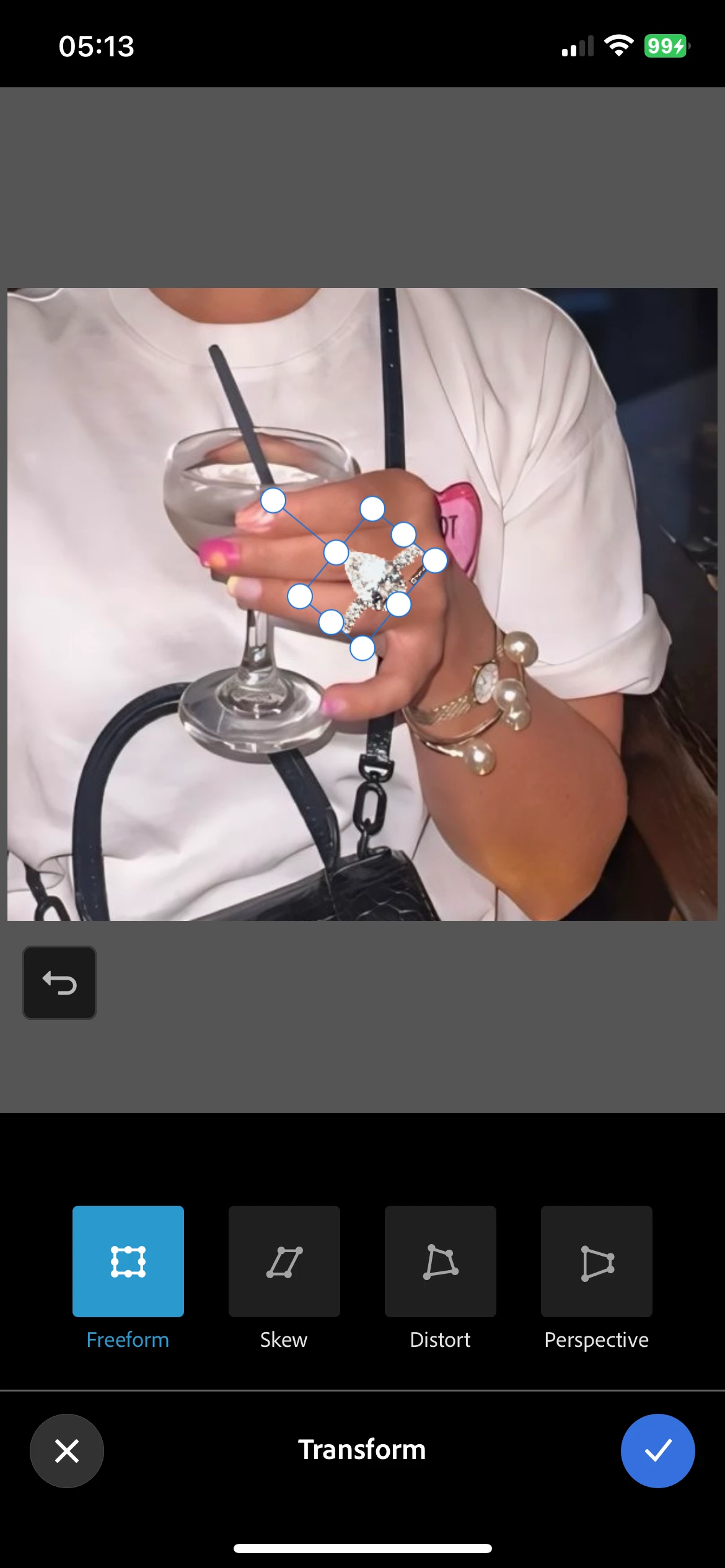
 tried to combine 2 pictures. The top picture is just in a white box now with white circles that sometimes make the image smaller. And when you do make the top image smaller you can't see where your putting it. 

This topic has been closed for replies.

1 reply

Participant
July 30, 2024

I'm having the exact same issue. Before you could select the smaller photo and move it from anywhere on the screen. Now you need to have you finger directly on top of it, so that you can't see where you're putting it. I'm trying to ask customer service how to remove the white circles and they are no help...

Neelamk
Legend
July 31, 2024

Hi @John38903908s6nq, @Carol38885942bxei,


We are sorry for your difficulties. Please let us know the Photoshop Express application version installed on your device and the device OS details. Have you tried reinstalling the application to see if this helps?  Please share a screen recording of the workflow to investigate further.


We are here to help you.


Thank you,

Neelam


Participant
August 1, 2024

I have the latest PS express version 24.30


I'm using iPhone 13 Pro Max. 

here's an example. The photo of the chair is the background photo, and I'm trying to add an (small) image on top. After the latest update, these white circles that you're supposed to use to move or resize the image have appeared, and there is no option to remove them. Now I can't even see the image. Also, I now need to place my finger directly on top of the image to more it. Before I was able to simply click that image's layer and move it from anywhere on the screen so that I can see where I'm placing it.