
Inspiring
April 24, 2025
Question

Re: Adobe Express Mobile: Important updates & device requirement changes

  • April 24, 2025
  • 1 reply
  • 162 views

Bueno, si no lo he entendido mal están si estamos utilizando versiones anteriores debemos ACTUALIZAR y migrar los archivos. PERO QUÉ PASA SI NO DEJA ACTUALIZAR COMO ES MI CASO?. 
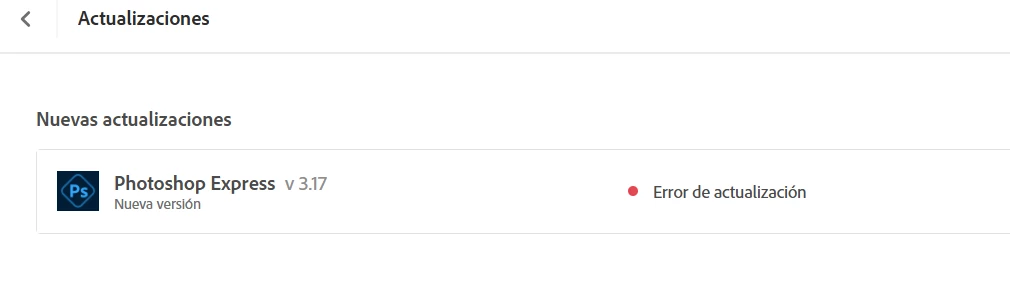
Cómo verá no me deja actualizar. Me indica error 501. Pero este tema ya lo he comentado y probado con otro compañero, creo de Adobe, y no hay manera de actualizar. Entonces entiendo que la aplicación de la Web de Adobe Express también está afectada con esas ACTUALIZACIONES QUE ADOBE ESTÁ REALIZANDO?. Yo no lo consigo. Gracias. No puedo migrar, en el caso de que lo necesite (porque yo uso la versión online de Adobe Express gratuita) porque no me deja actualizar. Gracias.

    1 reply

    creative explorer
    Community Expert
    Community Expert
    May 25, 2025

    @PANILIBERTAD It's incredibly frustrating when an app won't update and you're stuck with an older version, especially when Adobe is making changes that seem to require those updates for file compatibility. Error 501 usually points to a problem with the installation process, often related to conflicting software, antivirus programs, or even corrupted Adobe installation files, and it's not unique to Adobe Express but affects many Adobe products. Even though you're using the free online version of Adobe Express, the underlying technology or how files are saved can still be tied to these broader updates, meaning if you can't update the associated desktop components (like the Creative Cloud desktop app that might manage Photoshop Express or how it handles file saving), you might encounter issues like your files being unreadable by other programs. Unfortunately, without being able to complete the necessary updates, you're in a tough spot for migration or ensuring full compatibility. 

    I do think you need to thoroughly "clean" your mobile device for Photoshop Express by clearing the app's cache and data, or by completely reinstalling the app. This process removes any temporary files, corrupted data, or old settings that might be causing issues, giving Photoshop Express a fresh start. You typically do this through your device's app settings (e.g., on Android, go to Settings > Apps > Photoshop Express > Storage > Clear Cache/Clear Data; on iOS, you'll need to offload or delete and reinstall the app).

    m
    Inspiring
    May 25, 2025
    Mil gracias. Pero se ha resuelto. Pero no me pregunten cómo. Ha sido una
    actualización de Adobe. Un abrazo desde España.