


A Nuisance While Dragging Clips on the Timeline (Elements 12)
Hi!
There's a little problem I've been having with my Premiere Elements 12 since the day I started using it and I'm finally fed up with it. It's a very minor thing, but incredibly annoying while editing longer videos. I don't exactly know how to describe it, so I've made a quick 30 second video where you can see the problem:
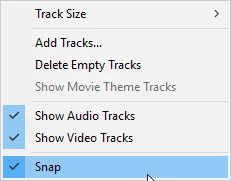
So as you can see, there is some button that triggers the dragging on the timeline to become smooth, smooth as in the clips don't momentarily attach to each other when you drag them around the timeline. This is annoying, because you have to zoom in as close as you can to the timeline and then set the clips the way you want them to go. It slows down the editing process greatly. It seems to be a project focal thing, so once triggered in one project, it doesn't affect any of the other projects. It also doesn't go away by exiting the project and then opening it again.
So, has anyone else had this problem? What is the button that triggers this? Thanks in advance!
- Aino

 AdChoices