
Participant
April 6, 2017
Question

Activating MPEG2 Component in PE7

  • April 6, 2017
  • 10 replies
  • 8645 views

I have used Premiere Elements 7 for many years to edit video and burn to dvd. I had a problem a few days ago with my operating system and installed a fresh copy of PE7. Then I ran into a problem when it came time to burn the dvd because the encoder activation link is broken.

Adobe does not want to speak to me over the phone about this matter and referred me to this forum.
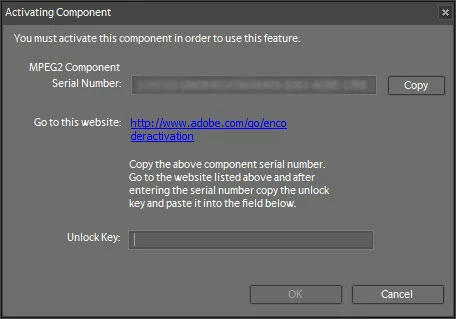
I have searched the internet for a solution and found another activation link but it doesn't work for me. Where can I find an unlock key?

This topic has been closed for replies.

10 replies

Participant
February 25, 2021

Has anyone found any other working activation links or unlock keys, preferably for premiere elements 11?


Thanks!

Participating Frequently
December 25, 2020

In the Unlock key Box, just type in:


BB02-10F1


Hit, 'OK'. This works for me all the time.

Note:

Be sure your computer is off line.

Participant
February 25, 2021

Hi, does this code still work for you? I tried using it for PE11 and it didn't work. 


Thanks!

Participant
February 25, 2021

It only works in PE7

That code for PE7 is: 

BB02-10F1

Legend
August 17, 2020

For the record, I hope you mean that the message was a load of crap. Not the messenger. I have no control over what Adobe does and does not do with regards to supporting older versions of its software.

Participant
December 23, 2020

Good morning,


Sorry to bump up an old thread, but I ran into this issue yesterday - my difference is I have an older PC with it all installed and activated, but that PC is almost at EOL so I am using my new desktop.  Do you know the File Directory where I can access these codecs to transfer to my new desktop? It is probably the simplest solution for me.


I purchased the newest Premiere elements a few weeks ago only to find out at the end of my project that HD disc burning is not supported anymore 😕😕 I may be requested my money back.

Participating Frequently
December 24, 2020
*Adobe Premier Elements 7.0 Mpeg 2 Activation Code:*


*114310000369754390311117-0001-ADBE-77BE*


*BB02-10F1*
Participant
August 17, 2020

I found a workaround to this issue.  1 - use an online or other converter to convert your mp4 files to AVI. Edit as AVI in Premier Elements 7 and export the file. Then I used the Adobe Media Endoder in my CS3 package to upload as MPEG2.  A couple years ago I went to get support for my CS3 and because they no longer offered support, they gave me the full CS3 Production Suite that does not need to be registered ever.  The Adobe Media Encoder in it doesn't need activation. Also, the SmartSound installer with Premiere Elements 7 found and installed itself in CS3, so that's fun as well 🙂 

Participant
April 27, 2020

Good morning all. I, too, cannot activate the MPEG 2 component of Premiere Elements Version 7. CV has given me the opportunity to use the Premiere Elements Version 7 I purchased many years ago. I did a bit of reading and determined that PE 2020 included several new features that I could benefit from. And, so I also purchased a copy of Premiere Elements 2020. Now, I have two Adobe Premiere Elements products that fail to function correctly. And, from reading the community "support" dialogs, they never will. I created a great video aggregating multipe wedding videos into one, using several tools available in PE 2020. But, then I attempted to burn a DVD on a PC. No way. After some research I discovered that Adobe is trying to tell me that it fails to recognize my DVD drive because, perhaps, maybe, some other application has "taken hold of it". Very professional diagnosis. But, low and behold. If I use PE Version 7 on the same PC, it finds the DVD drive no problem. OK, knowing I will receive no support from Adobe, and also knowing that I needed to produce the aggregated video as a gift to my wife during CV "stay at home", I created an MPEG 2 file in PE 2020. And, I will open it in PE version 7, and burn the DVD in that application. Clever, eh? Nope. I try to open the MPEG 2 in PE Version 7, and I'm told I don't have the necessary encoder, and I am directed to a link. I dutifully follow the link; but, it fails. I come here and try a bit of what may have worked for a few of you. NG. Then I read Mr. Grisetti's comments. Steve, can I call you Steve, I bourht Version 7 with the understanding that I was getting a full version of the software. Adobe chose to provide some components via download. I did not. So, regardless of how "old" the version 7 may be, Adobe should continue to provide the software that I paid for years back. If they had provided all the software in the box at the time of purchase, or, downloaded it immediately when I first used version 7 I wouldn't be in this mess. This is Adobe's problem, not mine. so, how do we get past this problem?. You suggest that it may be possible to use some modules from a more recent version of PE to allow version 7 to open an MPEG 2 file. Can you be more specific regarding which modules, perhaps by providing the names of the code you're thiinking of. I am happy to experiment to resolve the problem on Version 7, although I would be much happier if PE 2020 was corrected to find the DVD burner. That is the best solution. But, I not holding out a lot of hope for that. And, yes, I posted a note highlighting that problem as well. Thanks in advance for your help. 

Community Expert
April 27, 2020

Have you tried online support for version 2020 to get the DVD burner working?


Legend
August 4, 2018

Well, in fairness, you're looking for active support for a 10 year old product.

If the product was installed back in 2008, it will still work. You won't be forced to upgrade if it serves your needs.

But if you're doing a new installation of a product a decade old, you can't expect those old activators to still be running on the product's web site.

Participant
January 24, 2020

Just my opinion of course but I think that if you pay several hundred dollars for a piece of plastic, you can expect them to just not remove a service which probably costs less than a dollar per day.

Participant
January 24, 2020

And furthermore, it gives very negative experiences to customers!
I just bought Adobe Premiere Elements 12 for over $50, installed and it ran without any problems. But then, I wanted to export the project and it came up with this activationg thingy. It p***** me of, honestly. Hours of work for nothing! It makes no sense that I install a product, enter my serial number and then it wants me to again verify something AFTER I worked on a project for hours! Yes, I will not consider Adobe in future, will look for an alternative unless these guys fix up their activation link already!

Thanks for your help guys, it is not your fault of course.

Participant
August 13, 2017

This worked for me thanks

SacSteve
Participant
April 27, 2017

The OPs link worked for me with PE2 MPEG 2 encoder activation error.

Thank you for your post!

Legend
April 11, 2017

Glad you found a solution -- but sorry you found my input to be a load of crap.

Thanks for sharing the link. It may help others dealing with the same issue.

Legend
April 6, 2017

These activation components are no longer available. (This is, after all, 8 year old software.)

Download and install the free trial of Premiere Elements 15. It's possible that it will install the components and you'll be able to use them for version 7.

SOMETIMES this works.

EAECAuthor
Participant
April 10, 2017

Steve,

I have purchased one of your books in the past, but with all due respect, what you stated about activation is a load of crap. Even if the PE7 is 8 years old, Adobe still has a duty to support it because they instituted a registration process that cripples my legitimately purchased software. They can release a version that doesn’t require registration when its supported lifespan comes to an end.

This is exactly what happened to me with Audition 3. Several years ago I ran across a similar problem and Adobe phone support provided me with a link to download a copy that doesn’t require registration. (By the way, I’m not that impressed with Adobe telling me to go to the forum’s and have fellow user’s try to figure out a solution.)

To sum it up, I have found PE7 to perform well and do exactly what I want to accomplish. With a fresh install of Windows 7, do you really think a dead link on Adobe’s site should be a compelling reason to upgrade?

I did some more searching and found yet another activation link which worked for me.

Participant
October 25, 2020

Thanks for the link to a different Adobe codec license activation page.  It worked to make MPEG2 available in PE 10

This is what worked:  https://www.adobe.com/special/encoderactivation/sw_activation02.html

But ... it's a Flash page.   Windows informs me (Oct 2020) that Flash will be disabled on Dec 31, 2020.

I, like the others, am appalled that Adobe doesn't even have a redirect from their old activation page to this functioning one.

It demonstrates that their *system* can still issue license codes.

It's simply the old page that 404's. 

PE 10 is also crippled by demanding that the (my username).Photoshop.com  site be working.

Without it, i seem to be unable to register the package or get Help (altho the Help may be due to Microsoft killing the old Help system as they moved up the Windows tree).

Kudos to EAEC for digging out the (at this moment) operational site.