


Participant
February 16, 2018
Question

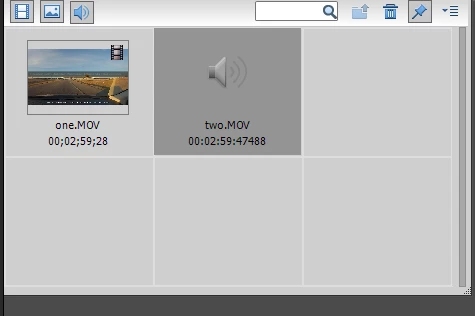
Add Media only adds audio, not video

  • February 16, 2018
  • 3 replies
  • 354 views

I've been trying to upload a couple of video files. For some reason one will upload with no problem but the second one always adds just the audio, not the video even though they're both MOV files as shown in the picture. What causes this, and how can I fix it?
This topic has been closed for replies.

3 replies

Legend
February 17, 2018

Unfortunately, Kenwood isn't posting the specs of the MOVs, so we can't make a recommendation without more information.

Open one of these MOVs in the free download MediaInfo. Set MediaInfo's View to Text and then copy and paste the report it generates to this forum.

Once we know the specs of the file we'll be better able to help you. It's pretty likely a camera like this is shooting video that isn't intended to be edited, so it likely has variable frame rates and/or non-standard frame rates and a compression system other than the standard H.264.

Ann Bens
Community Expert
Community Expert
February 17, 2018

Its H.264 in a mov wrapper, but the codec might be incompatible with Elements

So convert the mov with HandBrake to mp4 and constant framerate before importing into Elements.

Ann Bens
Community Expert
Community Expert
February 16, 2018

Have you got Quicktime installed?

Legend
February 16, 2018

Also, which version of the program are you using on what operating system?

And what model of camcorder is your MOV coming from?

Participant
February 17, 2018

Quicktime is installed. I have Windows 10 Home and Premiere Elements 2018 free trail, Windows 64-bit. The MOVs come from a Kenwood DRV-410 car dash cam.

Ann Bens
Community Expert
Community Expert
February 16, 2018

Moved to Premiere Elements​ forum