
Participating Frequently
Jan 1, 2017 3:36 PM UTC
Answered

Add Remove Keyframe is greyed-out

Am using elements 11 on a Mac

This used to work but now I don't understand why I am unable to add keyframes in the motion effects window. I can still add a keyframe in the timeline but I would prefer to work in the applied effects window. See image:
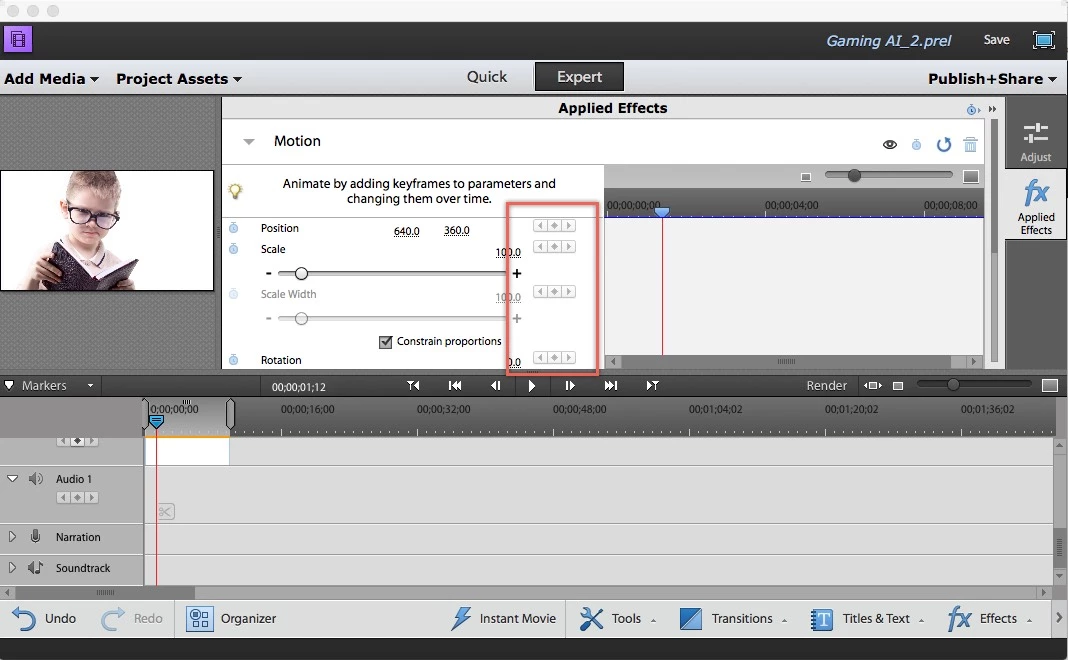
I can't find any settings for this or why in one project the keyframes are active but in another they are not. The image is a simple bitmap

This topic is closed to new replies. Start a new post to keep the conversation going.
Ann Bens
Ann BensCorrect answer
Community Expert
Jan 1, 2017 4:46 PM UTC

What if you hovered over the stopwatch? Does it get highlighted?

2 replies

Ann Bens
Community Expert
Ann BensCommunity ExpertCorrect answer
Community Expert
Jan 1, 2017 4:46 PM UTC

What if you hovered over the stopwatch? Does it get highlighted?

Translate
Participating Frequently
Jan 1, 2017 5:15 PM UTC

Yep that did it

I just needed to click this - for the key-frame(s) to become active

thanks

Translate