


Participant
April 4, 2020
Answered

Adobe Elements : Import .mp4 has bad color

  • April 4, 2020
  • 2 replies
  • 388 views

Hi,

Adobe Elements 17.0 (20180830.daily.1636760).

Recently, an import is with bad color :
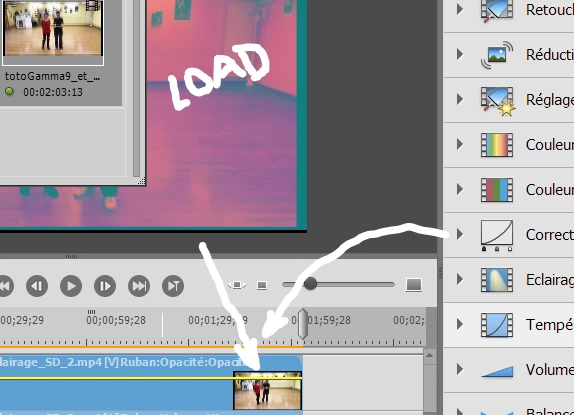
Correction with Gamma = 9, Light (just below Gamma correction in the right side) = automatique, make video OK nearly exactly as small pictures.

With these correction, export .mp4 is OK since I verify with VLC, but if I import that one then the color is always bad, as the original, as shown under "LOAD".

How to get correct import as usual (as I never modify anything in parameters !) ?

Regards

This topic has been closed for replies.
Correct answer Ann Bens

This is a graphics card driver issue. Update driver.

2 replies

Kris_34Author
Participant
April 11, 2020

Hi,
Everything went well in the meantime. I do not know why. The date of the last automatic update of the graphics card driver is OK. The update had to be done right after.
Thanks anyway.

Regards

Ann Bens
Community Expert
Ann BensCommunity ExpertCorrect answer
Community Expert
April 4, 2020

This is a graphics card driver issue. Update driver.