Known Participant
Oct 20, 2018 11:31 PM UTC
Answered

Adobe Elements Premiere 2018, how to change Defualt Text settings

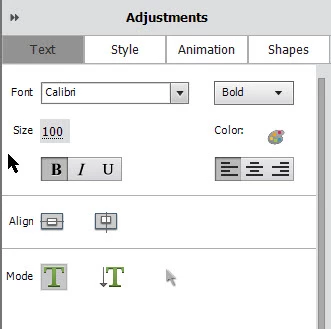
Is there a way to change the default text setting so you do not have to change them each time you add a title.

These are the settings I would like.
    This topic is closed to new replies. Start a new post to keep the conversation going.
    Steve GrisettiCorrect answer
    Legend
    Oct 21, 2018 12:12 AM UTC

    Your only option for changing the default settings is to open the Style tab, right-click on a Style and select the option to set it as your default.

    4 replies

    Known Participant
    Oct 21, 2018 1:11 PM UTC

    Thanks,

    Ok, that saves the style, and it comes up in the style that I like, now is there a way to do the same thing with the Font and size?

    Glenn

    Translate
    Community Expert
    Oct 21, 2018 1:21 PM UTC

    I have not found that option anywhere.  I'm 99% sure you can't change the default font.

    Translate
    Known Participant
    Oct 21, 2018 4:26 PM UTC

    Ok, thanks at least the style is set and all I have to do is reset the font and size. Thanks

    Translate
    Steve GrisettiCorrect answer
    Legend
    Oct 21, 2018 12:12 AM UTC

    Your only option for changing the default settings is to open the Style tab, right-click on a Style and select the option to set it as your default.

    Translate
