


Participant
January 26, 2019
Answered

Adobe Premiere Element 15 lagging

  • January 26, 2019
  • 2 replies
  • 756 views

I have a lagging problem with the video preview Adobe Premiere Element 15.

I am editing a recording from a stage play. Four cameras recorded the play, and I'm editing the whole thing together.

The video from one of the cameras is lagging in the video preview. The recordings from the other three cameras are fine.

How can I solve this problem? (My technical skills are a bit limited.)
    This topic has been closed for replies.
    Correct answer Steve Grisetti

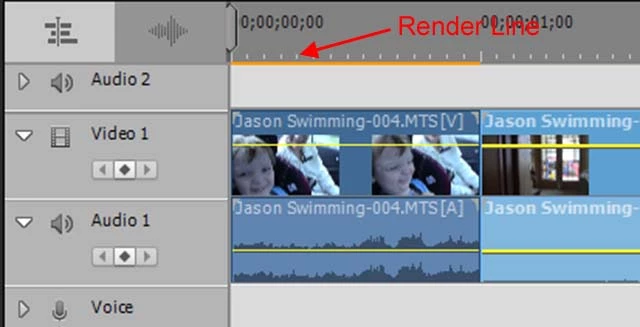
    Are all four camcorders recording their video to the same resolution, codec and format? You'll know if they are because, if they are, you will NOT see a yellow orange "render" line alone the top of the timeline when you add video from any of the camcorders.

    I suspect you're mixing formats -- which you can do, but it's much more a drag on your hardware and, if your machine isn't powerful enough, it can slow things down. Especially when you're editing over half and hour, an hour or two hours of video.

    2 replies

    Legend
    January 26, 2019

    That would of course be one solution. And it may be the simplest.

    The free download Handbrake is probably the most reliable tool out there. Without knowing more about your computer and camera specs, I recommend that generally you'll do best by converting your video to 1920x1080 MP4s at 30 fps with the AAC audio codec.

    Community Expert
    January 26, 2019

    To save work and time, maybe only the footage from the lagging camera needs conversion to something that matches the other three. 

    You may also be able to use Premiere Elements to convert.  Open a project specifically for the footage from the lagging camera.  Then output a new video that matches the specifications of the other three.  Use the new video in the master project.

    Steve GrisettiCorrect answer
    Legend
    January 26, 2019

    Are all four camcorders recording their video to the same resolution, codec and format? You'll know if they are because, if they are, you will NOT see a yellow orange "render" line alone the top of the timeline when you add video from any of the camcorders.

    I suspect you're mixing formats -- which you can do, but it's much more a drag on your hardware and, if your machine isn't powerful enough, it can slow things down. Especially when you're editing over half and hour, an hour or two hours of video.

    Participant
    January 26, 2019

    Thank you! It seems like this is precisely the problem!

    What do you recommend me to do? Convert the recordings to the same format?