


milanp91758702
Participant
June 3, 2017
Question

Adobe Premiere Elements 11 - stopped working. Please can anyone help resolve this?

  • June 3, 2017
  • 4 replies
  • 344 views

This was working a few months back and now whenever I attempt to capture video from my DV Camcorder I get the pop up shown below. I checked and ensure that my setting were for DV and PAL:
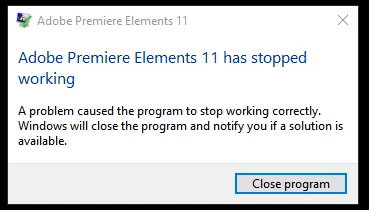
EventLog has these details:
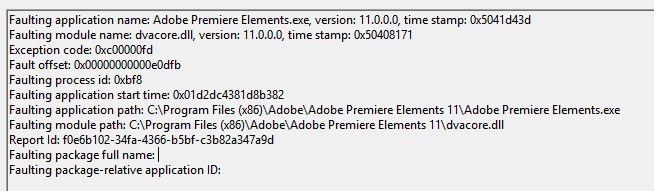
Is there anything I can do to overcome this.

1. I have uninstalled my App twice and reinstalled to no avail

2. I have the latest version of QuickTime 7.7.9

3. OS is Windows 10

Thank you in advance - hope someone can help me resolve this.

-

This topic has been closed for replies.

4 replies

Legend
June 22, 2017

I don't know why you would have this problem with Windows 10.

milanp91758702
Participant
June 21, 2017

Hi Steve,

Updated the drivers to post-2017 - Version 382.53 WHQL ~ Date 2017.6.9

Restarted PC and still not working after selecting DV from options!! :-(

Legend
June 5, 2017

nVidia drivers have been causing problems with a number of Adobe programs.

Go to the nVidia site and ensure that you have the latest drivers and that these drivers are post-2017.

Legend
June 3, 2017

Which graphics card do you have?

milanp91758702
Participant
June 5, 2017

Hi Steve

My Video/Graphics card is nVidia GeForce 750 ti (4gb)

Cheers

Milan