


Participant
October 19, 2020
Question

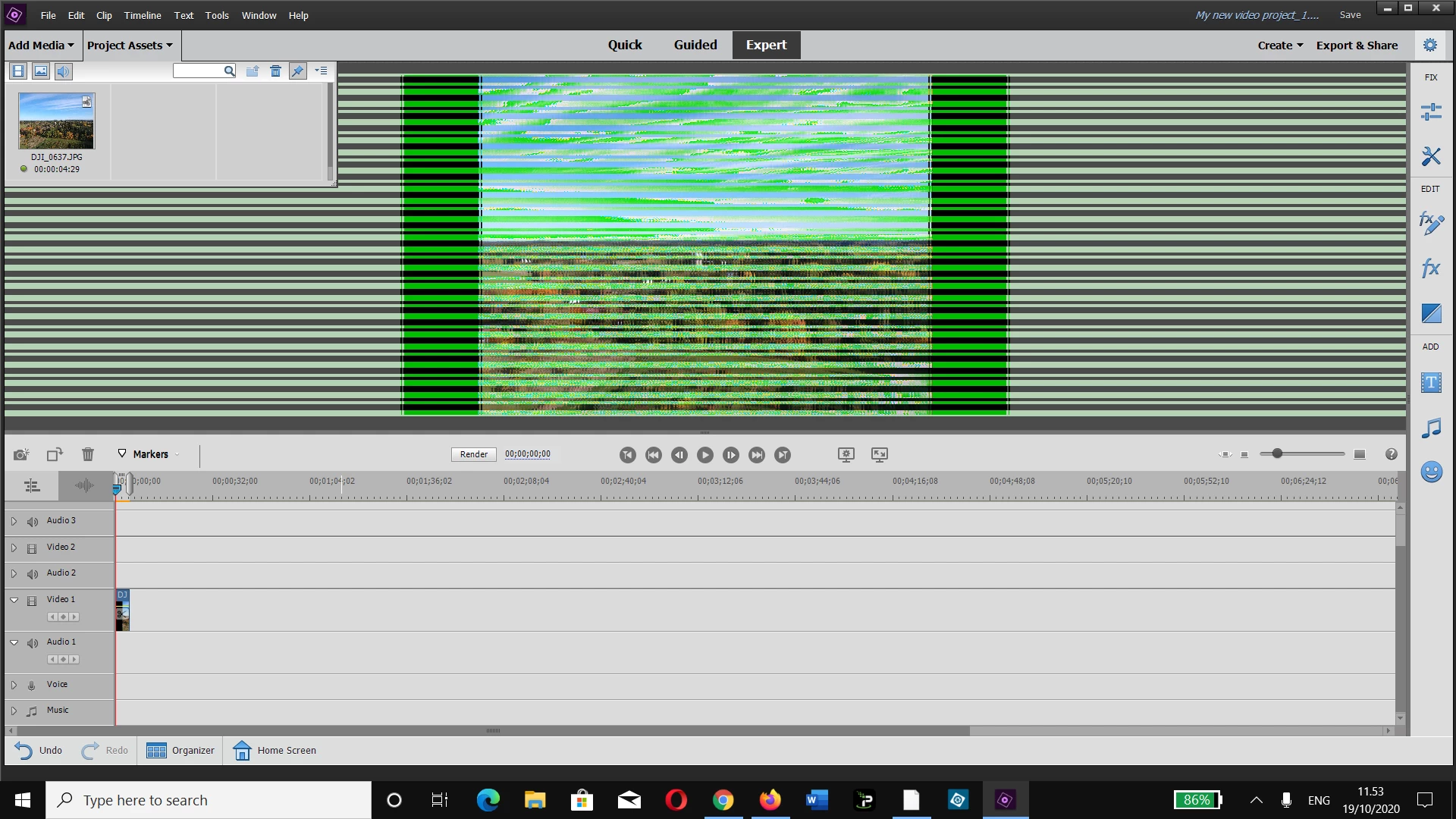
Adobe Premiere elements 2020 ver 18.1 image import problem

  • October 19, 2020
  • 2 replies
  • 240 views

What is the problem? When I open any file in Premiere elements I get this!? My set up is Lenovo Thinkpad 25 edition with latest  BIOS and Windows 10 pro version 10.0.19042 build 19042. Is it some driver incompatibility problem?
 

This topic has been closed for replies.

2 replies

Community Expert
November 19, 2020

If updating to the latest video driver doesn't fix it, then a 'roll back' to an older driver will.  No, it is not convienent, but getting a 'compatable' match between video editor and graphics card is necessary.    

Legend
October 19, 2020

Go to the AMD or nVidia site and download the latest driver for your graphics card. (Updates are released at least monthly.) Don't trust Windows to do it.


The latest GeForce drivers, for instance, were released October 7.

JuzikB82AAuthor
Participant
November 19, 2020

Sorry did not solve the problem. Now Premiere is totally unusable! Adobe Experts advised to upgrade to 2021 version, I tried the trial ver, Same problem! A junky programme