

SageAnon+
Participant
November 3, 2021
Question

Adobe Premiere Elements 2022.exe - Entry Point Not Found

  • November 3, 2021
  • 6 replies
  • 3574 views

I just recently purchased Premiere Elements & I cannot run it.  After installation, I get the following message:
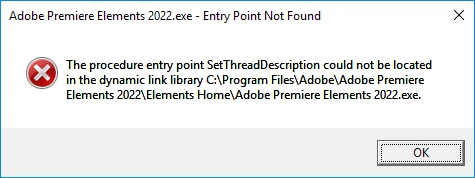


"The procedure entry point SetThreadDescription could not be located in the dynamic link library C:\Program Files Adobe\Adobe Premiere Elements 2022\Elements Home\Adobe Premiere Elements 2022.exe"


When I open the file location, I see the executable is located in the folder so I have no idea what is causing this error.  I have already installed the Visual C++ Redistributive environment & even ran the Adobe Creative Cloud Cleaner, & even uninstalled then reinstalled the program, but nothing seems to work. 

This topic has been closed for replies.

6 replies

Known Participant
July 4, 2022

Yeah you need to install this first and then install APE 2022


Visual C++ Redistributable for Visual Studio 2012 Update 4
https://www.microsoft.com/en-in/download/confirmation.aspx?id=30679

https://www.microsoft.com/en-in/download/confirmation.aspx?id=30679

Known Participant
July 4, 2022

I am getting the same error during installation, right at the end.

Participant
May 22, 2022

 The file location is :   C:\Users\Owner\AppData\Local\Temp\


I Hope this helps!

Participant
November 10, 2021

I have this same issue. 


Anyone have a solution?


Community Expert
November 10, 2021
quote

I have this same issue. 


Anyone have a solution?


By @Tommy5C88


Yes.  Contact Adobe support at https://helpx.adobe.com/contact.html?rghtup=autoOpen

Peru Bob
Community Expert
Community Expert
November 4, 2021

I know that Premiere Elements is not part of Creative Cloud, but some Photoshop Elements users have done this succssfully:


Uninstall Premiere Elements and use the Cleaner tool:

https://helpx.adobe.com/creative-cloud/kb/cc-cleaner-tool-installation-problems.html


Try installing the creative Cloud app:

https://helpx.adobe.com/download-install/kb/creative-cloud-desktop-app-download.html


and then reinstall Premiere Elements.

Community Expert
November 4, 2021

If it were me, I would initiate a support chat with Adobe techs here:  https://helpx.adobe.com/contact.html?rghtup=autoOpen