


Participant
July 13, 2020
Question

Adobe Premiere Elements preview displaying green lines

  • July 13, 2020
  • 4 replies
  • 2268 views

I'm Running Premeiere Elements 2020 on a Dell PC, Intel (R) UHD Graphics 620

The preview screen displays horizontal green lines over the video - even with a simple still text image it does the same

I've updated the video driver to the latest version from Dell but now I'm stuck to know how I can continue using the application


Ideas welcome!
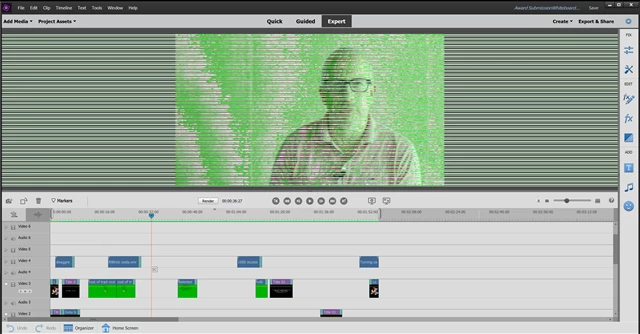
UPDATE: I have a workaround sorted for this by using an old Dell driver. Hoping they update the new one in a way that works.

This topic has been closed for replies.

4 replies

Participant
August 27, 2020

I too was experiencing this issue on a brand new Dell computer.  The issue is with the display driver.  To fix it, open up your device manager, toggle open the display adapters and right click on Intel(R) UHD Graphics. Click properties and toggle to the Driver tab.  Click the "roll back driver" button.  This fixed the problem for me. 

Participating Frequently
August 27, 2020
Thanks for your suggestion! Earlier today, I updated my Intel UHD driver
with the latest suggested by Dell. Now my "roll back driver" button is
grayed out. Could you tell me the driver id you are using?

Many thanks!
Participant
August 27, 2020

It's Driver Version 26.20.100.7870, Date 2/5/2020.

Participating Frequently
August 27, 2020

I would also appreciate any more detail on your workaround. Thanks!

Legend
August 27, 2020

I don't know how to say it any other way. This is an outdated video driver issue.

You need to go to the AMD, nVidia or Intel site (whoever makes our graphics card) and install the latest drivers from their site. There is no workaround. You just have to update your drivers.

Participating Frequently
August 27, 2020
Thanks for your response. I have gone to the nVidea site and installed the
latest driver. An earlier response to your post was from a gentleman who
said he found a workaround by downloading an earlier Dell driver. Since
nothing else is working for me, I thought maybe he could give a little more
detail on the driver he downloaded.

Thanks!
Participant
August 19, 2020

I just went to work on video project and all of a sudden my project playback looks just like the pic you have. I didn't have a problem before, but I think my dell with windows 10 had an update. Can you explain your work around?


Participant
August 19, 2020

I have the exact same problem. Just started yesterday 8/18/20. I would also appreciate more detail on your work around.

Legend
July 13, 2020

Have you tried installing the drivers from Intel?

https://downloadcenter.intel.com/product/126789/Intel-UHD-Graphics-620

Participant
July 13, 2020

Yes I did download the latest one -  but I've worked around what was indeed a driver issue by downloading an older driver from Dell


Not a great permanent solution but good enough to keep working for now


Thanks