



HOTELECHOMIKE
Inspiring
May 21, 2025
Answered

Advice Please with KeyFrames & Interpolation

  • May 21, 2025
  • 4 replies
  • 578 views


I use PE 2021 in a WIN 10 PC.

Take a look at: https://youtu.be/HMaNKOzv7oU

Its not quite ready but close. Request for advice below ...


The effects are based on Steve's tutorial (since removed) starting at 1:59 in my video.


The four icons that introduce each section are made as follows:
First the TLI is placed at the first frame of each section & a Freeze Frame taken.
In video 1 there is "04_Cloud" (from Graphics/Video Background).
The Freeze frames were imported and stacked one per video track with the one that is to "take over" being at the top.  At the very top of the stack is the text with labels - 3 seconds long.
Everything in the stack has default fade-in.


For the icon at the top of the stack via Applied Effects / Motion keyframes were placed at the 3 second mark.
Then at the end of the clip 2 more keyframes with position (960, 540) & scale 100.
The motion is of course linear.

See the graphic - the two keyframes at the 5 second mark are highlighted by the arrows...
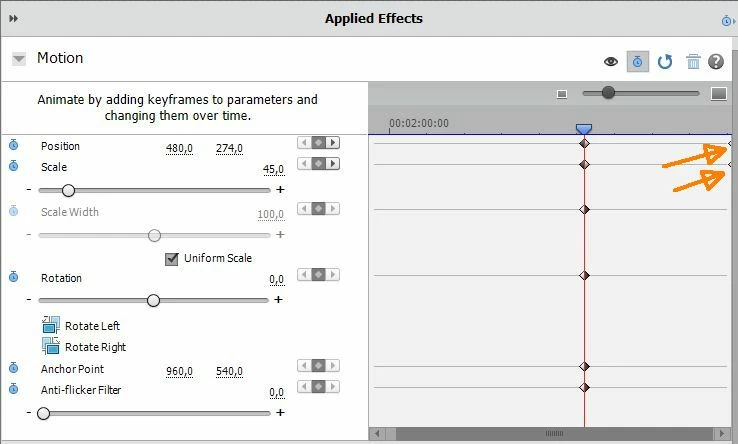
 

The result looks pretty good but is there a way to "smooth" the change at the 3 seconds mark from stationary to expanding to fill the whole screen?
Possibly even smoothing the stop at the end.


I found the following in the online user guide but so far have not fathomed out how to do what I want:

https://helpx.adobe.com/after-effects/using/keyframe-interpolation.html


All advice gratefully received.

Correct answer HOTELECHOMIKE

After some experimenting I managed to use Scale & Anchor point on the section starting at 1:59 in my video.

Basically it worked except that at the start of the movement (after 3 seconds) the expanding picture seemed first to expand outside the frame (top left) before covering the whole correctly.


However I believe that I have identified the jump issue - As a test I inserted the Freeze Frame as is before the pan & zoom sequence that currently starts after the movement & scaling has finished.  There is a jump between the Freeze frame & the start of the Pan & zoom sequence even though I have taken the Freeze Frame from the very start of the Pan & Zoom sequence.  This is rather odd - one would have thought that they would be identical.


I made a short test video to try to show the issue but of course that worked perfectly!


Finally I have completed my video: https://youtu.be/cvgjWo9VNtc

I had to redo some of the sequences & the Freeze Frames which then worked OK without the shudder - don't know what I did differently the second time around.


I found the "Ease In" worked OK but "Ease Out" had some wierd effects so I didn't use it.

I will remove the video test versions from Youtube ...

4 replies

HOTELECHOMIKE
Inspiring
May 22, 2025

I had the idea of inserting a clip of the freeze frame between my "stack" of pictures and the subsequent (identical) freeze frame with further animation (eg pan & zoom) with the thought that this would de-couple any interference.  Such a clip would be just 1 frame long ...

However this didn't meet with success - initially the inserted clip (copy of the appropriate freeze frame) was the standard 5 second long but there was still a "jump" at the transition from the clip with keyframes to the clip with the pure Freeze frame picture even though the position & scale at the end of the keyframes matches to those of the inserted freeze frame.


HOTELECHOMIKE
Inspiring
May 22, 2025

Thanks Ann,


You mean to remove the "Position" keyframe at the end of the clip & set the "Anchor Point" keyframe with "Ease In"?

Given that the is an "Anchor Point" keyframe at the 3-second mark will this have any effect?

Ann Bens
Community Expert
Community Expert
May 22, 2025

Delete keyframes for position and keyframe anchor point instead, for the pan.

HOTELECHOMIKE
Inspiring
May 23, 2025

After some experimenting I managed to use Scale & Anchor point on the section starting at 1:59 in my video.

Basically it worked except that at the start of the movement (after 3 seconds) the expanding picture seemed first to expand outside the frame (top left) before covering the whole correctly.


However I believe that I have identified the jump issue - As a test I inserted the Freeze Frame as is before the pan & zoom sequence that currently starts after the movement & scaling has finished.  There is a jump between the Freeze frame & the start of the Pan & zoom sequence even though I have taken the Freeze Frame from the very start of the Pan & Zoom sequence.  This is rather odd - one would have thought that they would be identical.


I made a short test video to try to show the issue but of course that worked perfectly!

HOTELECHOMIKE
Inspiring
May 21, 2025

Many thanks Ann for your suggestions which I carried out:


See the updated video:  https://youtu.be/EShyLxfMVYA


I use this effect at 4 locations in the video. I don't really seem much change at the "Ease In" but with "Ease Out" two of them look great; the other two seem a bit off at the end of the interpolation:


1:59 seems to have a slight step-back at the end

2:08 looks great

3.53 again the slight jerk at teh end

4:36 looks great.


Let me know what you think.

Ann Bens
Community Expert
Community Expert
May 21, 2025

Using pan and zoom at the same time can cause this.

Try using Anchor point instead of Position.

Alternative is to do the zoom, export, import and do the pan or vv.


Ann Bens
Community Expert
Community Expert
May 21, 2025

Go to end of clip and go one frame back,

Right clcik on keyframe > temporal interpolation.

First keyframe is ease out

last keyframe is ease in.