


Participating Frequently
November 24, 2018
Answered

Another question about adding stills

  • November 24, 2018
  • 1 reply
  • 528 views

Just got Premiere Elements 19 along with Photoshop Elements. Years ago, worked with Premier Pro, but when Windows switched over to 10, I didn’t update it.

I’d forgotten how still photos had to be resized. I’m working on a project with photos and some video coming in from a Samsung S9+. After the first disastrous attempt, I went back and searched through the forum and FAQs, focusing on adding still photos.

I’ve tried Process Multiple Photos to 2000, 1090, 720 pixel size. Tried different saves as .JPG and .PSD. Tried different resolutions. I’ve tried changing the Preferences, Default to frame size and the Use Hardware Acceleration. The Project Settings are 1920 x 1080. Tried changing the Interpret Footage settings. I render each time I add the stills.

The photos look fine in Photoshop, but with all the different attempts, when I add them to video, they are terrible. On the small viewing screen, they look okay. But if I go to full screen, they appear jagged and almost out of focus. Did a test burn to a DVD and the same thing on the TV, terrible quality. Basically, they look like garbage, my technical term for it.

I think I am missing something here, perhaps a post I didn’t read. Any help is appreciated. Thanks!
This topic has been closed for replies.
Correct answer Bill Sprague

You're correct, not a lot of options in Photoshop Elements.

I have the resize set to 1920 pixels (I've tried all the other recommended pixel settings), constrain proportions. Resolution is at 150 dpi. Convert files to .PSD

I've also tried going through and testing all the presets when you start a new project to see if those would make a difference.

Also checked how the Samsung S9+ saves videos. Appears the standard setting is 1080p HD video recording at 30 fps or 60 fps. And surprise, adding a video and it too looks crappy.

I do appreciate the help and screenshots are appreciated. Thanks!


LVMike  wrote

You're correct, not a lot of options in Photoshop Elements.

I have the resize set to 1920 pixels (I've tried all the other recommended pixel settings), constrain proportions. Resolution is at 150 dpi. Convert files to .PSD

I've also tried going through and testing all the presets when you start a new project to see if those would make a difference.

Also checked how the Samsung S9+ saves videos. Appears the standard setting is 1080p HD video recording at 30 fps or 60 fps. And surprise, adding a video and it too looks crappy.

I do appreciate the help and screenshots are appreciated. Thanks!

You appear to be doing way too much!

Take a fresh clip from you Samsung S9+.  Open a fresh project, add the clip and put it on the timeline.  Let it make the project settings.  Now add one photo without any editing, resizing, etc.  Output a video.  What's it look like?

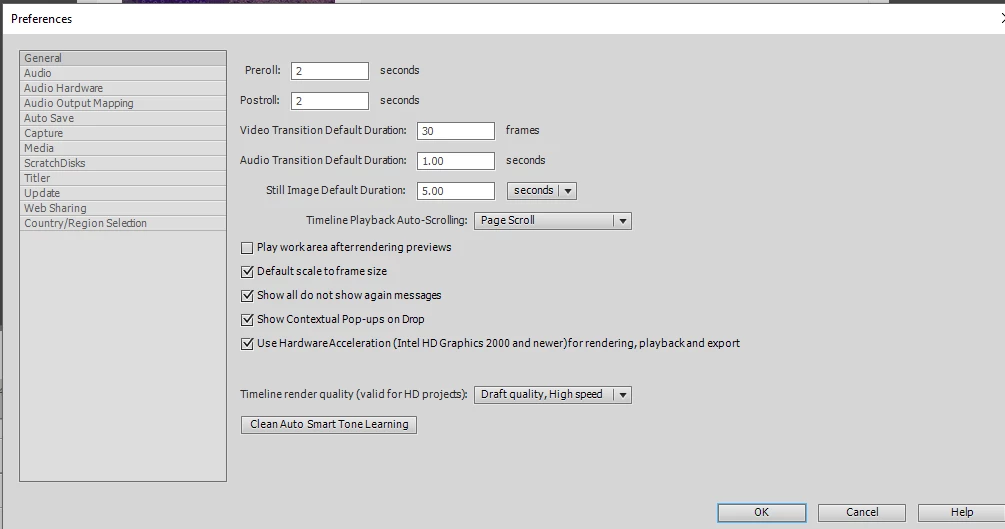
My Preferences page: 

1 reply

Peru Bob
Community Expert
Community Expert
November 24, 2018

What pixel size is the photo, video, and export?

LVMikeAuthor
Participating Frequently
November 24, 2018

The original stills are at 4032 x 1960 pixels and are .JPG. I've tried converting from Photoshop Elements 19 and bringing them in at the recommended sizes I've seen listed. The videos I've brought in seem okay at this point.

Community Expert
November 25, 2018

My experience is that stills do not have to be resized for Premiere Elements.  The only exception to that might be if your computer is too weak for the processing.

When you add anything to a project you are looking at real time previews.  Full screen pixel peeping might show fuzziness that won't be there for the final render. The final result at output may/should be much better. 

If you are burning DVDs, you are reducing resolution to old tube TV standards.  Everything looks terrible on DVDs.  You need to make MP4s using the H.264 codec to match the screen you'll be viewing on. 

If you would like to share a photo file via DropBox or similar, I'll try it on my machine and return the results.