
Known Participant
April 16, 2022
Question

Audio clip suddenly goes silent

  • April 16, 2022
  • 1 reply
  • 326 views

Here's an excerpted image from Adobe Premiere Elements 2022:
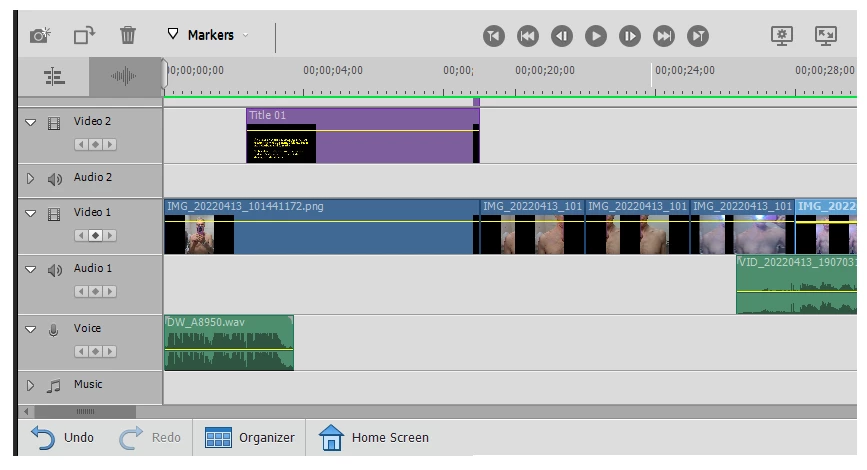
The green audio clip at right (VID) worked fine. I added the green one at left (DW). Now the green one at right is silent. Using Undo did not restore sound to the one at right. Any ideas what happened?

This topic has been closed for replies.

1 reply

Community Expert
April 16, 2022

I won't say that it is consistant, but audio on the Voice track will behave oddly sometimes.  I think the Voice track is intended for voiceovers recorded in Premier Elements.   Try putting the track on the left on a track above.  Audio 1 should work.  But, even Audio 2 or 3.   If it still isn't working, try checking the Preferences for Audio Hardware.  Default Audio Input should be set to "No Input".

Known Participant
April 17, 2022

Thanks for the suggestions. Preferences are set as suggested. All audio in the entire project remains silent except for that last-added DW clip, and removing it still does not help. Apparently my project is ruined. I have put in a lot of work on it. I bought APE 2022 to get away from this kind of obvious bug. Apparently I wasted my money.

Community Expert
April 17, 2022

If it were a "bug", this issue would be commonly reported on this forum.  I'm a "regular contributor" here and I've never seen it before.  There is something else going on with your footage or perhaps even a corrupted file.   


That said, if you bought from Adobe within the last thirty days, you can get your money back.  You can also get Adobe techs to try to remotely troubleshoot.  Both can be accomplished in an online chat session here:  https://helpx.adobe.com/contact.html?rghtup=autoOpen