


November 16, 2016
Answered

AUDIO TRACK level change problems

  • November 16, 2016
  • 1 reply
  • 294 views

Hi

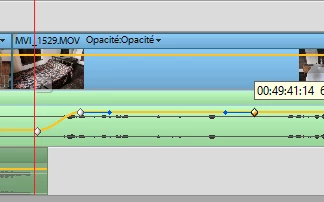
Since today, wenn I try to change the level of the audio track with CTRL+mouse I get my dot but a type of bezier line with  it and it is difficult to properly take it down or up. Has someoe a idea hat happenand can I do

Thaks

Claude
    This topic has been closed for replies.
    Correct answer Steve Grisetti

    You should not create keyframes using Ctrl+click.

    Instead, select the clip in your timeline and then use the Create Keyframe button on the track header to the left of the audio track. Then you won't get a Bezier.

    1 reply

    Steve GrisettiCorrect answer
    Legend
    November 17, 2016

    You should not create keyframes using Ctrl+click.

    Instead, select the clip in your timeline and then use the Create Keyframe button on the track header to the left of the audio track. Then you won't get a Bezier.

    November 28, 2016

    PE vers 11

    Hi

    Thank you very much for your answer. I found the way to use the keyframe through the adjustment panel, but I didn' find

    "the Create Keyframe button on the track header to the left of the audio track." I probably mist something. Where is this buttom on the header left to the track?

    Regards

    Cl