
Participating Frequently
April 19, 2022
Question

Auto Smart Tone Causing Video Quality Issues

  • April 19, 2022
  • 3 replies
  • 998 views

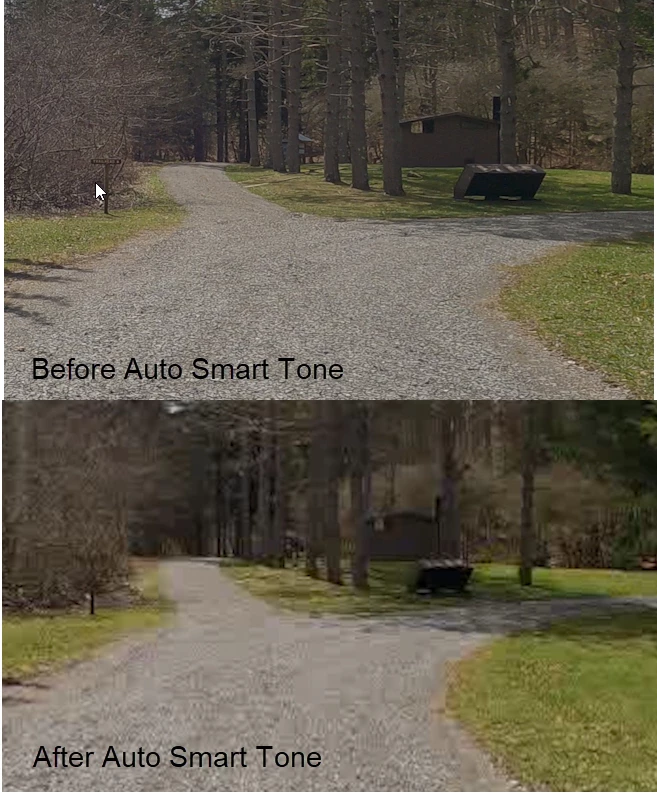
I'm using Premiere Elements 2021. Can anyone provide insight as to why whenever I use the Auto Smart Tone feature to touch up a clip the quality of the clip is degraded? Take a look at this screenshot from a video. The image on the left is the orginal. The image on the right is after Auto Smart Tone has been applied. This is occuring during the editing process and not during the export process so I don't think I'm dealing with an export issue per se. Rendering doesn't make any difference. There's something about Auto Smart Tone that is affecting video quality. This has been a long time issue for me. Thoughts? Thank you.
This topic has been closed for replies.

3 replies

srwingsAuthor
Participating Frequently
April 25, 2022

Does Adobe tech support monitor these posts?

Peru Bob
Community Expert
Community Expert
April 25, 2022
quote

Does Adobe tech support monitor these posts?


By @srwings


No.

Peru Bob
Community Expert
Community Expert
April 19, 2022

Automatic fixes don't always work as expected in all situations.


srwingsAuthor
Participating Frequently
April 21, 2022

The problem is that when I go back and look at any of the video I've edited in Premiere I see this problem. 

srwingsAuthor
Participating Frequently
April 19, 2022

It doesn't look like I can edit my post. I mistakenly refer to a left and right screenshot. I meant top and bottom.

Ann Bens
Community Expert
Community Expert
April 20, 2022

From my experience everything that says auto: avoid.

srwingsAuthor
Participating Frequently
April 21, 2022

Thank you, Ann.


Based on your suggestion, I removed the changes made by Auto Smart Tone and the pixalation went away. I then brought up the Lighting feature and under the Exposure tab I played around with Brightness, Contrast, and Exposure. What I found is that even making the smallest manual adjustment to just one of these items negatively impacts the video quality even more than the Auto Smart Tone feature does. Any suggestions on how to identify specifically what is causing the video degradation?