


AVCHD 1080p50 not showing up in Premiere Elements 11
I have Premiere Elements 11, which, according to what I have read, supports editing 1080p50 (or 60 in NTSC). When I create a project it is not showing up in the list of available presets. See the available list below:
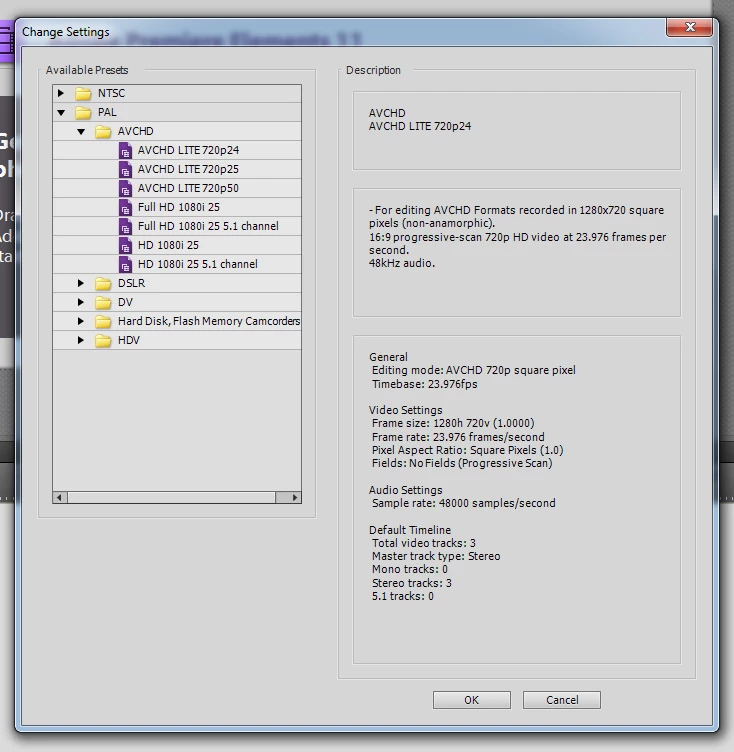
Checking the installation directories, I can see that the preset is actually installed on the computer. Screenshot below:
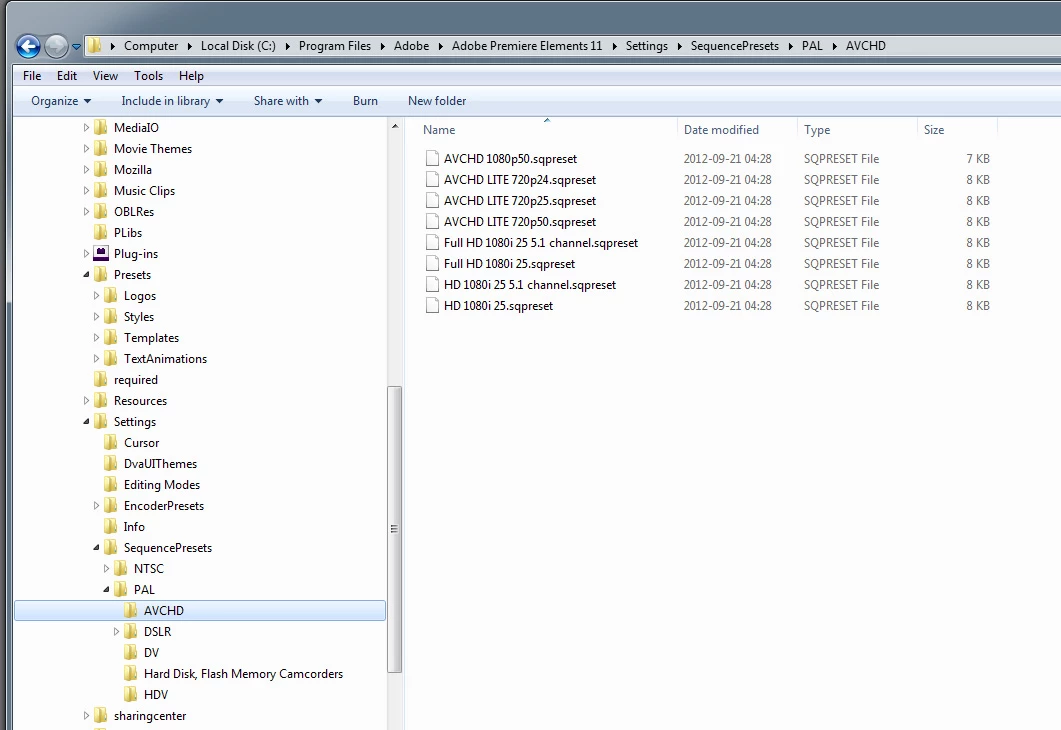
Comparing the two lists, all of the presets are available, except the 1080p 50. The preset has GUID 088bb726-9823-467e-b3b7-26f3703d4cf1, which is included in the Adobe Editing Modes.xml as EditingMode24, enabled on all platforms. I was going to attach both the preset and the editing modes xml to this question, but there doesn't seem to be a way to do that. They are both reasonably large files, so I am posting below only the definition of EditingMode24. I can post the contents of the preset as well, if required. I am on Windows 7 64bit.
| <EditingMode24 Version="2"> | |||||
| <EditingMode.SupportedPlatforms Version="1"> | |||||
| <EditingMode.SupportedPlatformCount>1</EditingMode.SupportedPlatformCount> | |||||
| <EditingMode.SupportedPlatform Version="1" Index="0"> | |||||
| <Second>true</Second> | |||||
| <First>All</First> | |||||
| </EditingMode.SupportedPlatform> | |||||
| </EditingMode.SupportedPlatforms> | |||||
| <EditingMode.IDs Version="1"> | |||||
| <EditingMode.IDCount>2</EditingMode.IDCount> | |||||
| <EditingMode.ID Version="1" Index="0"> | |||||
| <Second>088bb726-9823-467e-b3b7-26f3703d4cf1</Second> | |||||
| <First>All</First> | |||||
| </EditingMode.ID> | |||||
| </EditingMode.IDs> | |||||
| <EditingMode.Names Version="1"> | |||||
| <EditingMode.NameCount>7</EditingMode.NameCount> | |||||
| <EditingMode.Name Version="1" Index="0"> | |||||
| <Second>AVCHD 1080p Quadratpixel</Second> | |||||
| <First>de_DE</First> | |||||
| </EditingMode.Name> | |||||
| <EditingMode.Name Version="1" Index="0"> | |||||
| <Second>AVCHD 1080p square pixel</Second> | |||||
| <First>en_US</First> | |||||
| </EditingMode.Name> | |||||
| <EditingMode.Name Version="1" Index="0"> | |||||
| <Second>AVCHD 1080p píxeles cuadrados</Second> | |||||
| <First>es_ES</First> | |||||
| </EditingMode.Name> | |||||
| <EditingMode.Name Version="1" Index="0"> | |||||
| <Second>AVCHD 1080p - Pixels carrés</Second> | |||||
| <First>fr_FR</First> | |||||
| </EditingMode.Name> | |||||
| <EditingMode.Name Version="1" Index="0"> | |||||
| <Second>AVCHD 1080p pixel quadrati</Second> | |||||
| <First>it_IT</First> | |||||
| </EditingMode.Name> | |||||
| <EditingMode.Name Version="1" Index="0"> | |||||
| <Second>AVCHD 1080p 正方形ピクセル</Second> | |||||
| <First>ja_JP</First> | |||||
| </EditingMode.Name> | |||||
| <EditingMode.Name Version="1" Index="0"> | |||||
| <Second>AVCHD 1080p 정사각형 픽셀</Second> | |||||
| <First>ko_KR</First> | |||||
| </EditingMode.Name> | |||||
| </EditingMode.Names> | |||||
| <EditingMode.Players Version="1"> | |||||
| <EditingMode.PlayerCount>1</EditingMode.PlayerCount> | |||||
| <EditingMode.Player Version="1" Index="0"> | |||||
| <Second>9728470B-5EE7-4e96-9921-630DEA0AF639</Second> | |||||
| <First>All</First> | |||||
| </EditingMode.Player> | |||||
| </EditingMode.Players> | |||||
| <EditingMode.Recorders Version="1"> | |||||
| <EditingMode.RecorderCount>2</EditingMode.RecorderCount> | |||||
| <EditingMode.Recorder Version="1" Index="0"> | |||||
| <Second>7D3215DB-D698-4977-9602-7DC209B0D6B1</Second> | |||||
| <First>Mac</First> | |||||
| </EditingMode.Recorder> | |||||
| <EditingMode.Recorder Version="1" Index="0"> | |||||
| <Second>AE351743-B529-451e-A2D4-9CCF1AD8D8B6</Second> | |||||
| <First>Win</First> | |||||
| </EditingMode.Recorder> | |||||
| </EditingMode.Recorders> | |||||
| <EditingMode.FrameRect1 Version="1"> | |||||
| <Width>1920</Width> | |||||
| <Height>1080</Height> | |||||
| </EditingMode.FrameRect1> | |||||
| <EditingMode.FrameRect.Count>1</EditingMode.FrameRect.Count> | |||||
| <EditingMode.FrameRate1 Version="1"> | |||||
| <Numerator>24000</Numerator> | |||||
| <Denominator>1001</Denominator> | |||||
| </EditingMode.FrameRate1> | |||||
| <EditingMode.FrameRate2 Version="1"> | |||||
| <Numerator>30000</Numerator> | |||||
| <Denominator>1001</Denominator> | |||||
| </EditingMode.FrameRate2> | |||||
| <EditingMode.FrameRate3 Version="1"> | |||||
| <Numerator>25</Numerator> | |||||
| <Denominator>1</Denominator> | |||||
| </EditingMode.FrameRate3> | |||||
| <EditingMode.FrameRate.Count>3</EditingMode.FrameRate.Count> | |||||
| <EditingMode.PAR1 Version="1"> | |||||
| <Numerator>1920</Numerator> | |||||
| <Denominator>1920</Denominator> | |||||
| </EditingMode.PAR1> | |||||
| <EditingMode.PAR.Count>1</EditingMode.PAR.Count> | |||||
| <EditingMode.FieldType1 Version="1"> | |||||
| <Value>0</Value> | |||||
| </EditingMode.FieldType1> | |||||
| <EditingMode.FieldType.Count>1</EditingMode.FieldType.Count> | |||||
| </EditingMode24> |
I have noticed that this editing mode does not have a frame rate of 50p, whereas some of the other EditingModes do. Is that what is causing the problem?
Any help with this is much appreciated.
 AdChoices