


Mikey44MagBiker
Known Participant
August 26, 2018
Question

Backups ~ Time Shift Impossibility

  • August 26, 2018
  • 2 replies
  • 489 views

I'm running PE14 on Win7\64 and am only a stumbling amateur.

My backups folder is getting large, so I'm exploring how and why it is used.

Although I did play with videos today, I did NOT open the program or do any project.

That was yesterday.

My question:  How can I have a backup today?

How can this backup be dated with a time stamp hours in the future?
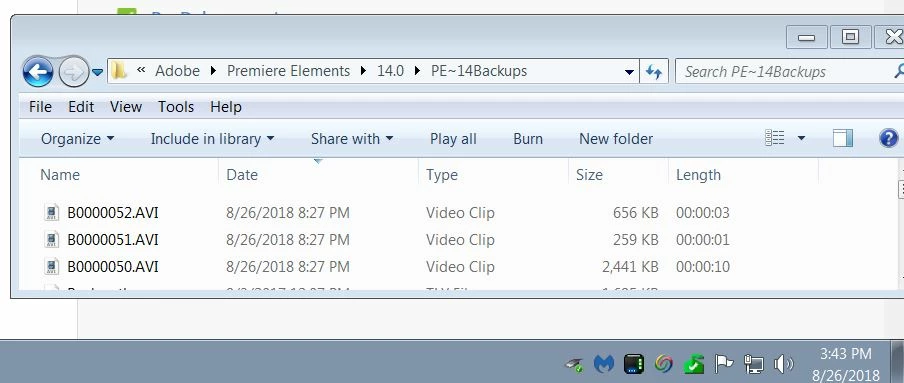
My system clock correctly says 3:43 PM, and the newest clip is stamped 8:27 PM.

Why would PE be active if I did not open it today? 

How can I stop creating backups?

I'm considering deleting the whole folder, since my workflow is create and discard the video work once distributed and I only keep the original media created by the camera.

Sorry about the multiple inquiries, I hope I'm just confused about a basic concept and can understand what's going on.

Thanks in advance,

Mike LeDuc

    This topic has been closed for replies.

    2 replies

    Legend
    August 27, 2018

    If the backups were set up in the Elements Organizer, go to the Elements Organizer. Under the Edit menu, go to the General page under Preferences. Click the button to Reset All Warning Dialogs.

    The next time you start the Organizer, you'll see a pop-up suggesting you set up media file backups. Check the option to never see this warning again and then click Cancel. That should keep you from seeing further auto backups.

    Mikey44MagBiker
    Known Participant
    August 28, 2018

    Thanks! Clear enough even for me...

    I will cease pondering the time-shift aliens that put file time stamps in the future, and just whack the whole process into oblivion.

    PE works swiftly and elegantly for my limited goals, the enhancement sweeteners are my only ambitious learning process, and life is good.

    If you agree, let's close this question out with my satisfaction.

    If you would like any other rambling input from me, I'm your huckleberry.

    Mike

    Legend
    August 26, 2018

    Where is this folder located on your hard drive? I'm having trouble finding a similar folder on my hard drive.

    Mikey44MagBiker
    Known Participant
    August 27, 2018

    Steve, to detail my setup I've started with the basics.

    Please refer to the attached screen grabs to follow.

    1. The original basis for my question, just repeated here.
    2. The program is as usual on the C: drive, an SSD.
    3. The 'R' drive is a RAID of 10.9TB where I store files & data.
      Premiere Elements is my next step.
    4. It has 9.0 old, and 14.0 current.
      I am not sure I need the old one...
    5. Within 14.0 I see stuff I do not recognize, and the 'Backups'
    6. The Oldest.  This has given me a major clue!
    7. The newest is again the subject of my consternation.
    8. The largest has confirmed my suspicions regarding the major clue.

    Yipes.  I thought I could just attach numbered files for you to click on...

    My clue as to where these came from seems to indicate the result of a workflow decision to rip all video out of my Lightroom CC Classic catalog and use the organizer in PE.  Sorry to say I found it clunky and poorly integrated with my habits so I have ceased all activity with it.  However, when I did use it, I did back it up similar to backing up my LR catalog.  Beyond that, I depend on a weekly mirror backup from the entire "R" drive to my Drobo.
    It has been a long journey to answer your simple question.  Sorry about that.
    Now, I'm more interested in your opinion as to me just blowing the whole PE backups away and figuring out how to stop the current process of backups.  My practice is to compose, distribute using DVD, BluRay, or AVCHD output and I don't save the projects since I only repeat my work perhaps once a year... so it is fine with me just to repeat the process from originals stored permanently.

    I do not know how to stop these backups, so please point me to the controls to cancel them.

    What do you think? 

    Thank you for your prompt reply.

    Mike LeDuc

    Valparaiso, Indiana