


Black pixels and worst playback on timeline
Hi
I just did some drone footage with my GoPro Hero3+. The gopro left me 3 video clips from my 3 shoots. They where taken on the same day but at different times.
When I insert 2 of them they work flawless with premiere elements 15. But the last one is useless in Premiere.
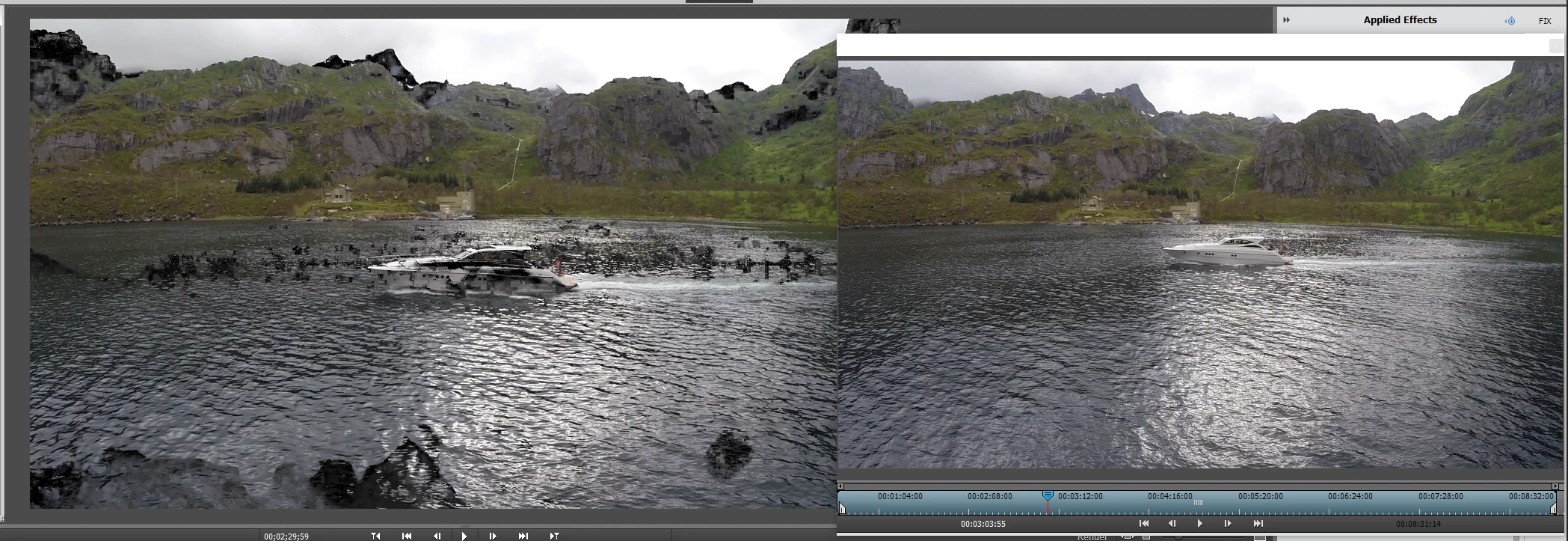
I get black pixels and the playback from the timeline is terrible, even if I try to render the video. When I play the video from the Project Assest the media player pops up in premiere and lets me play it before I add it to the timeline. Everything runs smoothly there. I have tried to run it on VLC, windows mediaplayer and everything is good there. No laggy video or pixels there. I even installed Lightworks and there is no issues there with the video, no black pixels or lagg. If I add the rest of my videos to the same timeline/project in premiere, everything runs great except the footage I have problems with.
I just post my hardware spec. I dont think this is the problem since I have never had any problems with my hardware before. The CPU is old but its just means that the export time takes longer. There is no Issues whats so every when I play the video in another program. Premiere is installed on my C drive. I know the SSD performance is good enough. But I have tried to put it on the same drive. different SSD and even a spinndrive. Same problem. Looks to me this is not a playback issue but something buggy in permiere rather then the video clip itself. I did try to copy the clip from the SD card again just to be sure it manage to be corrupted over filetransfer. But it still working good on every device I have tried.
WIN 10 OS
Intel i5 2700k CPU
16GB 1600Mhz Ram
1070 GTX Nvidia
Samsung 250GB
On the screenshot I took. You can see the bad quality from the timeline on the left and right side is from adobe media player before I add it to the timeline.
 AdChoices