

Inspiring
January 14, 2021
Question

Can't Export Completed Video

  • January 14, 2021
  • 4 replies
  • 488 views

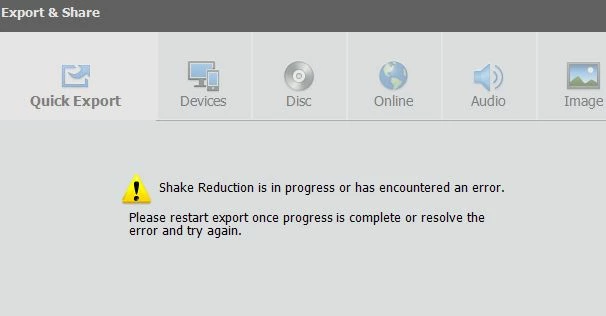
After spending 2 hours editing a video I can't export it.  I get this error.  Anybody know a fix?


This topic has been closed for replies.

4 replies

Community Expert
January 15, 2021

Jim,


I'm starting to be old at 75.  Rock solid video has been hard!  A couple weeks ago I bought the the really weird DJI Osmo Pocket 2.  So far I'm impressed beyond expectations.  

Community Expert
January 14, 2021

Jim,

That error message suggests another issue with the stabilzer effect.   Again, my experience has been to pre-process clips that need stabilizing.  If I understand it right, the stabilzer has to first stabilze the preview so that you can do your editing.  Then at output it has to do it all over again and can generate errors.   


I'm sorry I can't give you a better answer.   

i_am_jimAuthor
Inspiring
January 15, 2021

This time I only had one clip.  I think I'm going to have to give up on the stabalizer.  The problem is I'm an old man and have tremor so my videos bounce around something awful.  It did a wonderful job the first time. I just couldn't export it.

. Windows 10 -- Premiere Elements 2018 -- Photoshop CC
Ann Bens
Community Expert
Community Expert
January 15, 2021

This message means the clip is too shaky to be properly stabilized.

You will have to adjust the parameters of the stabilize effect.

If it still gives the error message then its alas.


Community Expert
January 14, 2021

The shake reduction workflow can cause frustration.  I've had the same error message.   It may be caused by a lack of memery, lack of disk space or CPU overload.  The foolproof work around is to pre-process clips that need it.  The put those clips into your master project.   In your case, your most time effective remedy may be replacing the clips causing the trouble.  

i_am_jimAuthor
Inspiring
January 14, 2021

I have 32 GB of ram and acres of disk space, so it can't be those.  I don't know how much of the CPU was being used.  I was only using the application.  But, though inactive there were 3 more applications open, the background utilities and Microsoft uses CPU.


I did it over in a quick way.  This time I got a different error message.  I don't use this program much, so I haven't the vaguest idea what the message means or how to do what it says.


. Windows 10 -- Premiere Elements 2018 -- Photoshop CC
John T Smith
Community Expert
Community Expert
January 14, 2021

1st question... are you doing shake reduction?

If yes, does the process complete?

If no... what I would do

Exit the program, saving my project if appropriate

Start the program/project again and try to export

i_am_jimAuthor
Inspiring
January 14, 2021

Yes, I did shake correction.  It finished,

I had done that. Got same message.

. Windows 10 -- Premiere Elements 2018 -- Photoshop CC
