


Participant
October 20, 2021
Question

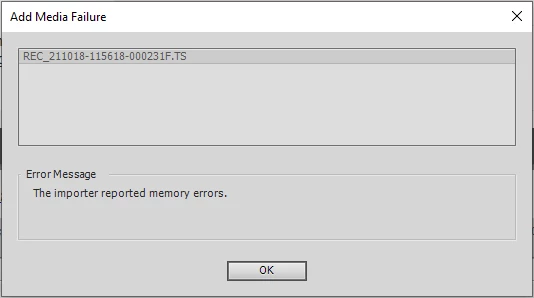
Can't import a 30MB .TS file: "Add Media Failure / The importer reported memory errors"

  • October 20, 2021
  • 2 replies
  • 857 views

Running Adobe Premiere Elements 2019 (v 17) on Win10 x64.

Trying to import .TS files for editing.

No matter what size file I pick - from 300MB down to 30MB - Premiere Elements pops up the window 

Add Media Failure - The importer reported memory errors

This machine has 16GB RAM and Premier Elements is the only application running. 

How do I fix this? I'd really appreciate an advice. Thanks!
 

This topic has been closed for replies.

2 replies

Community Expert
October 20, 2021

The internet suggests that "The TS file format is used primarily to save streamed or broadcast video."  Premiere Elements is more narrowly focused on files from common cameras.  Suggestions online are that you need to convert the .ts file to a more common MP4.  Two free programs that should do that are Handbrake and VLC.   


Reference:  https://www.dumbofab.com/resource/convert-ts-to-mp4-free.html

Yanna KAuthor
Participant
October 23, 2021

Thanks Bill, I've used VLC to convert the.TS files to other formats, but Premiere Elements still refused to import them.

I tried to upload my GoPro files (which Premiere Elements used to import w/o problem), and it barfed.

Finally, I tried to open a .prel project file that I did with with this Premiere Elements installation on this very computer, and look what I got:


[It] won't even open its own project file. 

I'll try to reinstall as I don't have any other ideas.


Note: Edited by moderator


Peru Bob
Community Expert
Community Expert
October 23, 2021

You don't import a .prel file.

You double click on it and it will open Premiere Elements.


It is a project file, not a media file. 

Yanna KAuthor
Participant
October 20, 2021

BTW, here's the MediaInfo about the file I'm trying to import. Does it help identify the problem?