


Participant
January 21, 2021
Question

Can't import video files - Elements 2018

  • January 21, 2021
  • 3 replies
  • 235 views

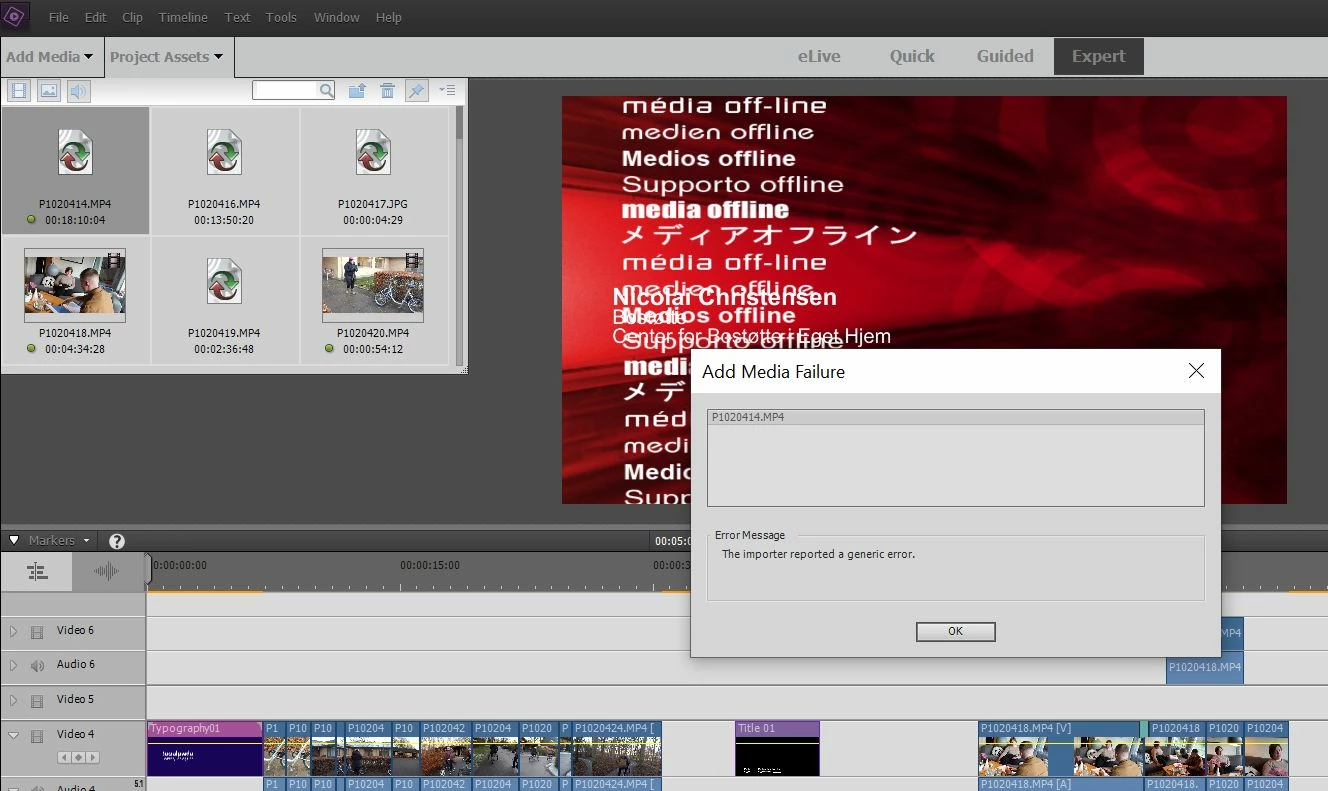
Suddenly, I can't add my videofiles (MP4) into my project. I have used the files before with no problems, but now it says "the importer reported a generic error". I use Premiere Elements 2018.

Anyone who could help, please?

/Christian


This topic has been closed for replies.

3 replies

Participant
January 22, 2021

Hi Ann and Bill,

Thanks for your answers. Actually, I have the files in my folder and I can play the with no problems in Windows Media Player. But when I try to import/relink them to my project in Premiere Elements I get the error message. 

I made my project for a year ago with no problems and now I have to edit it - and suddenly I can't relink/import ...

Legend
January 22, 2021

If the screen capture you're showing in your original post shows what happens when you try to add a file, then Bill and Ann are correct. You do not have a link to a file. You have a broken link.


I assume your MP4s are on your hard drive. As an experiment, place one of those MP4s on your desktop, open a new project and use Add Media to add it to this new project. Are you still getting this error?

Community Expert
January 21, 2021

Don't move or delete your source files until the project is fully complete.   They are not "in" the project.  They are only linked to the project.   If you need to store the project for later work, the Archive funtions are there to help with that. 


As Ann says, you need to relink them.   You can do that by putting them back where they were or tell Premiere Elements where you put them.  If you fully deleted them, you have no options. 

Ann Bens
Community Expert
Community Expert
January 21, 2021

The file is already in the project. You need to relink hence the red screen.