thomaso14706177
Participant
August 2, 2020
Question

Can't Render Video

  • August 2, 2020
  • 1 reply
  • 274 views

Hello, 

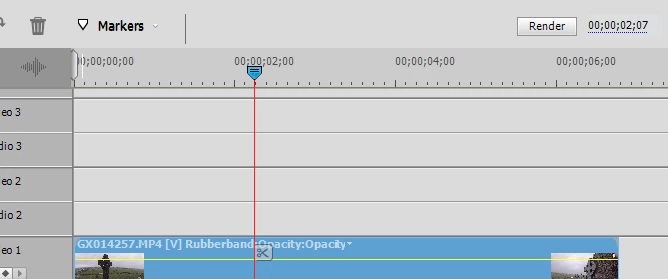
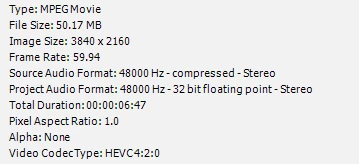
I'm trying to utilize premier elements 2020 to create a 3-4 video from gopro footage of a trip we recently took.  Below is the properties of the video clip.  Will previous versions/clips/etc, I'd load them into the project render, cut out/edit a part, render and review.  I'm not able to render the video in the project and it's beyond frustrating because the video gets all choppy when playing it back.  I'm used to seeing an orange/yellow bar after you drop in a video into the timeline, that doesn't even show up.  It's so weird.  


Any thoughts?  


This topic has been closed for replies.

1 reply

Legend
August 2, 2020

It looks like the program has matched your video specs. To confirm it, go to the Edit menu and check the General page under Project Settings. Are the settings listed the same as your video specs?


If you're okay there, which processor do you have with how much RAM? 4K video does need a lot of processing power.

thomaso14706177
Participant
August 2, 2020

Thanks Steve.  

It doesn't look like the settings under project setting>general match the video quality.  When I restart the project, it gives me the option to change settings there.  What preset would allow 4K with the formatting I have? One doesn't stand out.  If select a 1080p 60fps and check the box "Force selected Project Setting on this project" then it seems to allow me to render the video in the project.  I'd assume at that point it's just taking the higher quality video and cropping it to 1920x1080.  Not the end of the world.  


For additional reference, I have an i7 7th gen Intel Processor.  And a Nvidia GeForce 940mx gpu.  

Legend
August 2, 2020

So what project settings were being used in the screen shot you posted on August 1?