


Answered
Change/Organise Track in Timeline by default
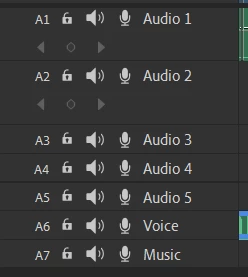
When I take a new project, the voice and music goes to the bottom. Is there any way I can get them on the top right when I start a new project?

When I take a new project, the voice and music goes to the bottom. Is there any way I can get them on the top right when I start a new project?
Already have an account? Login
Enter your E-mail address. We'll send you an e-mail with instructions to reset your password.

 AdChoices