Participant
March 2, 2019
Answered

Clip Monitor Window - Premiere Elements 2018

  • March 2, 2019
  • 2 replies
  • 624 views

In the Clip Monitor window, when you set an in and out point, can you preview it?   I know you can go to the in point and go to the out point, but I see no way to play your selection without inserting it into the timeline.  (you can do this with Premiere Pro I believe)

And...

If you only want to use the audio from a audio/video clip in the clip monitor window..... is there a way to just insert the audio into the timeline?  I think the only way is to insert video and audio into the timeline and then delete the video.

Thanks

    This topic has been closed for replies.
    Correct answer Ann Bens

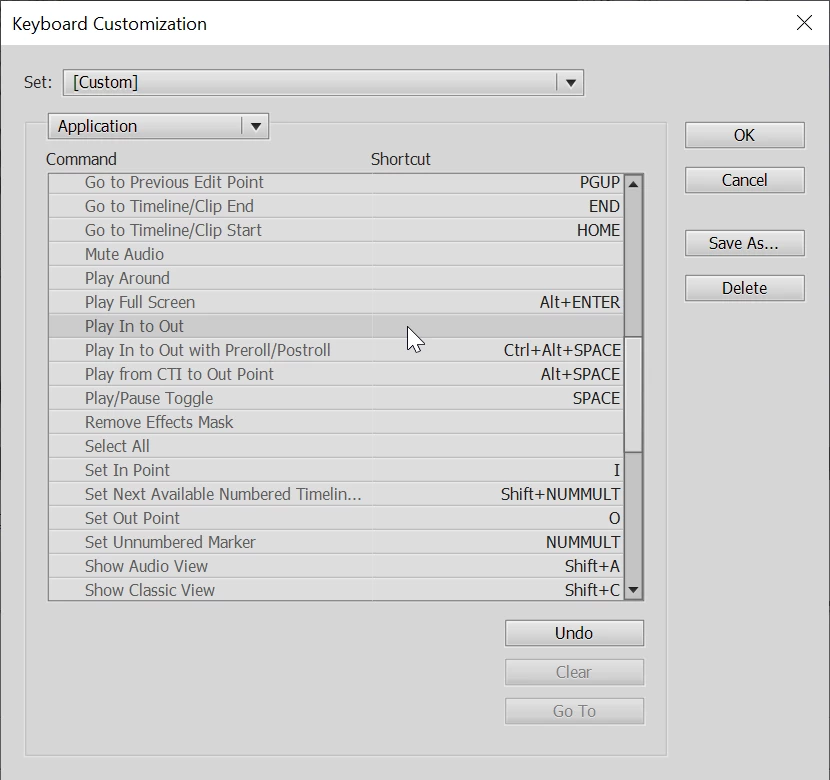
    In the keyboard shortcuts there is an option to set a kbsc for play in to out.

    2 replies

    Ann Bens
    Community Expert
    Ann BensCommunity ExpertCorrect answer
    Community Expert
    March 3, 2019

    In the keyboard shortcuts there is an option to set a kbsc for play in to out.

    Community Expert
    March 3, 2019

    I missed that one Ann!  Good work!

    Participant
    March 3, 2019

    Thanks Ann and Whsprague.   Mapping the keyboard shortcut works perfectly.  (in the monitor/preview window)

    Interesting thing I discovered.... it doesn't work if you mark an audio or video in and out point.  But it does work if you just mark an "in" and "out" point.

    Thanks again.

    Community Expert
    March 2, 2019

    It will play in the clip monitor, but you have to position the CTI.   You may be able to speed up your process if you customize a keyboard shortcut to go to the In point. 

    There is no way I know of to separate the audio before putting it on the timeline.

    Participant
    March 2, 2019

    >It will play in the clip monitor, but you have to position the CTI.

    It plays in the clip monitor no problem.  But it doesn't stop at the designated "out" point.  It plays the entire clip.

    Thanks.

    Community Expert
    March 2, 2019

    paulg64523931  wrote

    It plays in the clip monitor no problem.  But it doesn't stop at the designated "out" point.  It plays the entire clip.

    That's correct and why I've never found the clip monitor step a part of my work flow.  For me it is easier if I put the clip on the timeline and do the editing there.  It is easier grabbing the ends of the clip when it is on the time line that moving in and out points in the clip monitor.