Participant
May 14, 2021
Answered

Clips nach Import in Timeline nicht nach Name sortiert

  • May 14, 2021
  • 2 replies
  • 378 views

Guten Morgen

Frage an Euch alle: Wenn man aus dem Projektfenster mehrere Clips in die Timeline zieht, werden diese in der Timeline nicht nach Name in der Reihenfolge sortiert, sondern willkürlich durcheinander. Kann mir hier jemand schreiben, was ich da einstellen muss? Vielen herzlichen Dank für Eure Hilfe und beste Grüsse

Thom

This topic has been closed for replies.
Correct answer HOTELECHOMIKE

Guten Morgen,


When you click on Project Assets (near top left of screen) a drop-down appears with your various assets.

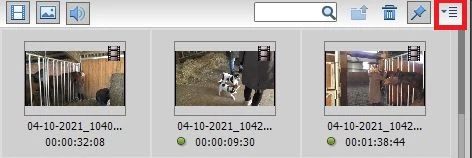
Click on the "burger" icon at top right-hand side.

In the small popup that appears the second item is "Sort by".


Here you can sort by File Name, Duration & Size (all ascending).

Having sorted your assets you can then select a group (or all) & drag onto the timeline & they will appear in that order.


MfG


2 replies

HOTELECHOMIKE
Inspiring
May 14, 2021

Please mark my solution as correct.

HOTELECHOMIKE
HOTELECHOMIKECorrect answer
Inspiring
May 14, 2021

Guten Morgen,


When you click on Project Assets (near top left of screen) a drop-down appears with your various assets.

Click on the "burger" icon at top right-hand side.

In the small popup that appears the second item is "Sort by".


Here you can sort by File Name, Duration & Size (all ascending).

Having sorted your assets you can then select a group (or all) & drag onto the timeline & they will appear in that order.


MfG


Thom2021Author
Participant
May 14, 2021

Thank you very much. In that program, it works. Best regards

Thom