


Participating Frequently
August 26, 2020
Question

Colors Washed Out Upon Export (Premiere Elements)
  • August 26, 2020
  • 3 replies
  • 1047 views

Hello,

I’m hoping someone can help me solve an issue where the colors in my video appear brighter/washed out upon export.


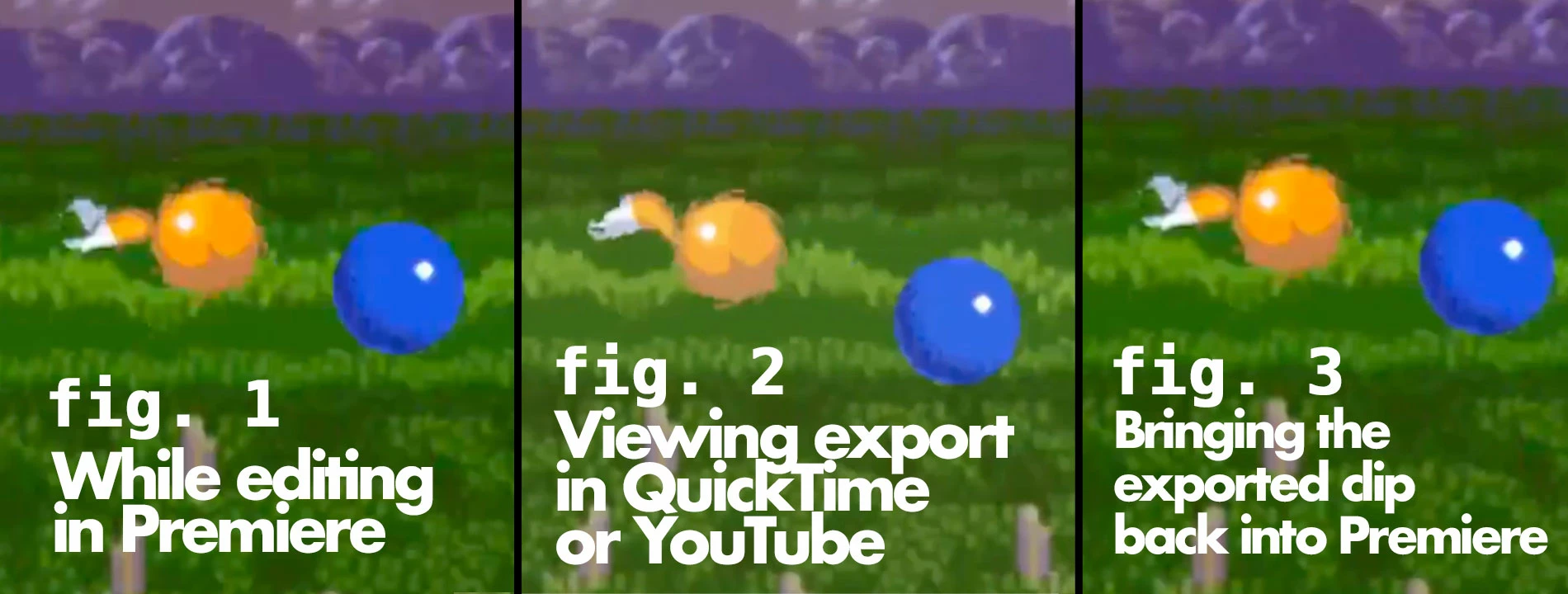
While editing in Adobe Premiere Elements, everything looks great. (Fig. 1 in the accompanying image.)

When I export it, the exported video looks washed out, when viewing in QuickTime Player on my macbook. I uploaded it to Youtube and it also looks this way when viewing on Youtube on my Macbook, on my chromebook, and viewing through the YouTube app on my Television. (Fig. 2)

Oddly, when I bring the exported footage back into an Adobe Premiere Elements project, it appears within Premiere with the correct colors. (Fig. 3)

Additional Info: The export is MP4 H.264, high quality, 1920x1080.


Any idea why this color discrepancy is happening and what I can do to fix it?

Thanks!

Alex

This topic has been closed for replies.

3 replies

Participant
September 3, 2020

I am having the exact same issue. Premiere's preview just saturates everything by 10% or so. It happens on every display I tried. And it is a very recent problem (may have started in the last update). 

Funny enough, the only workaround I found was to saturate everything by 10% on Premiere, so it will look as it was supposed to on export. 

Legend
September 3, 2020

I don't see your MediaInfo report. Once we see the MediaInfo report we will have a better idea why your footage is behaving as it is.

Participant
September 3, 2020

Hey Steve

It is not a specific problem with a codec, video file, or project. It happens to every h264, prores to any other video file that I import into a new project in Premiere and After Effects.

It looks one way in any other application, and it looks more saturated on the Premiere and After Effects preview window.

The difference I experience in saturation is exactly the same as in Zeavo's example. And as in his situation, I had to make a workaround: Saturate everything by 110 in Lumetri applied on an Adjustment layer over the full timeline.

I'll downgrade the versions of CC just to compare it. 

Inspiring
August 26, 2020

Sometimes this kind of problems are caused but wrong luma range. Please see this:

https://community.adobe.com/t5/premiere-pro/h-264-gamma-shift-washed-out-colours-on-export/td-p/4406872?page=1

Legend
August 26, 2020

This does not appear to be camcorder footage. Where did you original footage originate?


Open one of your original clips in the free download MediaInfo. In MediaInfo, set View to Text and then paste the text from this report to this forum. Once we know the detailed specs of your source footage we may be able to find out why this is happening.


In a normal workflow, Premiere Elements does not change the video colors in any way.

ZeavoAuthor
Participating Frequently
August 27, 2020

Hi Steve,

Thanks so much for your response.

The footage is captured from Youtube using OBS.

After experimenting a little more, I found that the captured footage file (which is an MP4) itself has the washed out issue (like in Fig 2), which would mean that Adobe Premiere Elements isn’t “causing” the wash-out (OBS seems to be the culprit). However, if the footage itself is washed out, then it seems like Adobe isn’t representing it properly when bringing it into an Adobe project.  If the footage itself is washed out then why isn’t Adobe showing that it’s washed out? It gives a false impression of what will eventually be truly exported, as is the case here.

I tried capturing footage from Youtube using QuickTime instead of OBS, and it looks much closer to what it should be, so that will be my "fix" from now on.

However, I’m too deep into production of this current project to re-capture and re-implement all that footage, so what would be the best band-aid solution for this current project, i.e. which levels to alter (generally speaking)?  Brightness? Contrast? Doesn't need to be picture perfect but just a reasonable fix to the current wash out problem.

Thanks again so much!

Alex