


Participant
February 20, 2019
Answered

dealing with a partly cloudy day in premiere elements 14

  • February 20, 2019
  • 1 reply
  • 283 views

I have made a video outdoors on a beautiful day with bright sunshine and fluffy clouds.  Every time a cloud passes by, the picture goes darker, when the sun reappears, the video looks great.  Is there any way to prevent the great difference in the 'brightness' or 'exposure' (whichever is relevant)?  Or once it is recorded, can it be adjusted--like maybe a video gain effect?
This topic has been closed for replies.
Correct answer Bill Sprague

I've found that with my cameras auto exposure works pretty well at compensating for changing light.  

Video does not have the range that photography has.  You can still make adjustments.

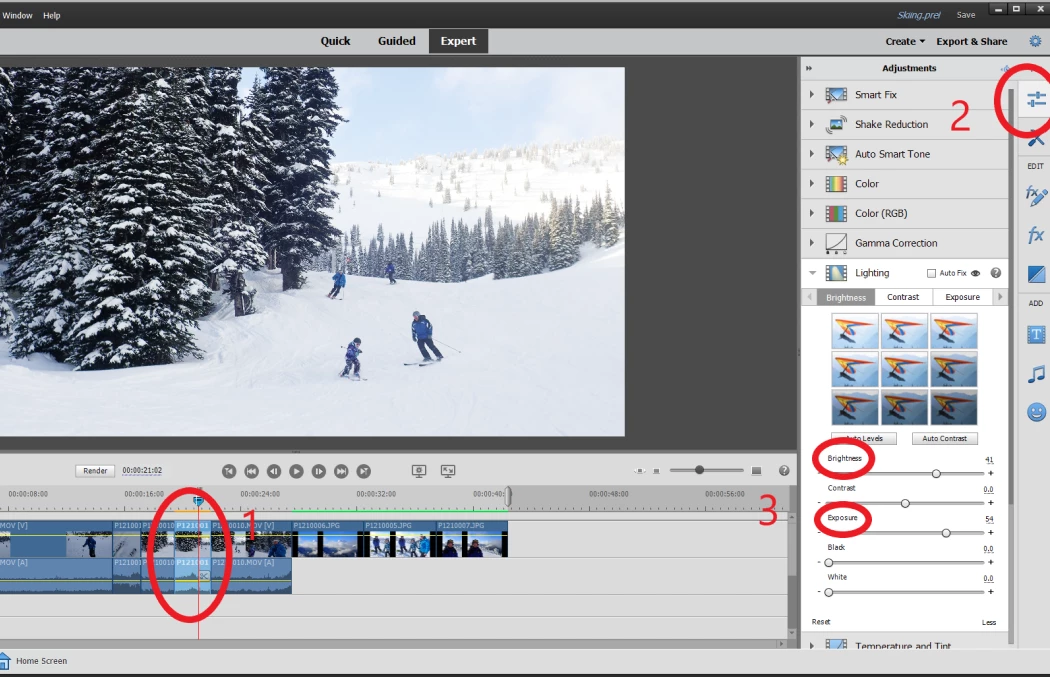
1.  Isolate the part you want to change by selecting the clip.  If you have to, put cuts on the portion of the clip to isolate it from the whole clip.  Select what you've isolated.

2.  Open the Adjustments tab.

3.  Tap the More button to drop the sliders into view and adjust the preview image.

1 reply

Bill SpragueCommunity ExpertCorrect answer
Community Expert
February 20, 2019

I've found that with my cameras auto exposure works pretty well at compensating for changing light.  

Video does not have the range that photography has.  You can still make adjustments.

1.  Isolate the part you want to change by selecting the clip.  If you have to, put cuts on the portion of the clip to isolate it from the whole clip.  Select what you've isolated.

2.  Open the Adjustments tab.

3.  Tap the More button to drop the sliders into view and adjust the preview image.

Participant
February 22, 2019

Thank you very much for your helpful reply and the screen illustration.  Unfortunately, it seems my poor Panasonic HC-V550 doesn;t provide auto-exposure in the video mode.  I'll use the workaround as feasible.

Community Expert
February 22, 2019

I have nearly the same camera.  It has auto choices.  They work.  Here is a cut and paste from the HC-V550 manual.