
Participant
Oct 3, 2020 4:16 PM UTC
Question

Display issue when importing video files.

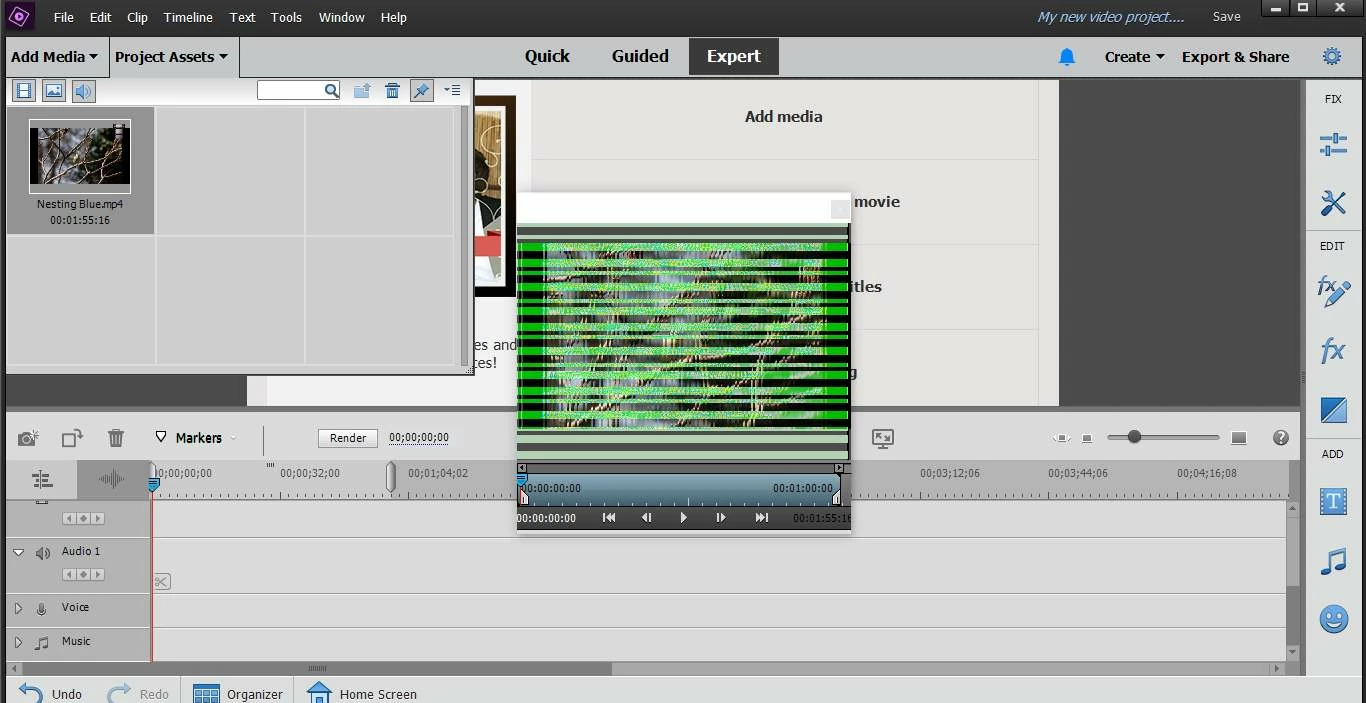
I have been using this program importing and creating video files with no issues. However been I now open any video file the video file appears fragragmented, breaking up with horizontal noise lines, see attached screen shot. I have un-installed the product, rebooted and installed the software again and the problem still exists. I am running Windows 10 on a laptop. As stated the software was working successfully on this machine for a number of months. Has anyone got any ideas what the issue is please?

Thanks in advance, Alan.
 

This topic is closed to new replies. Start a new post to keep the conversation going.

2 replies

Greg_S.
Community Expert
Community Expert
Oct 3, 2020 11:35 PM UTC

You have posted your question in the Photoshop Elements forum.  I will move it to the Premiere Elements forum.  Based on your screenshot, it looks to me like a graphics driver issue.  I would suggest updating your GPU driver from the manufacturer.  If that is not the issue, I am sure the experts over on the Premiere forum will want to know the format of the video files that are causing problems.

Translate
Alan5FB7Author
Participant
Oct 4, 2020 8:42 AM UTC

Hi Greg,

Thank you for coming back so soon.

I have since discovered, after looking at the Driver version in Device Manager the driver was updated automatically by a Microsoft Update in late August. Although I have had no problems with other applications installed on my laptop, this updated driver is the cause! I searcched the Internet, from the driver menu option for a updated driver and received a message the driver was the latest. I chose the "Microsoft Generic Driver" from the Driver list and this solved the problem.

I have now sent a message to Acer Support with details of my machine asking which Driver I should use as there are two listed for my machine on their website.

Thank you for your support!

Best wishes, Alan.

Translate