



StuMarksez
Participating Frequently
September 20, 2019
Question

Ease IN Ease OUT Not Working
  • September 20, 2019
  • 7 replies
  • 2947 views

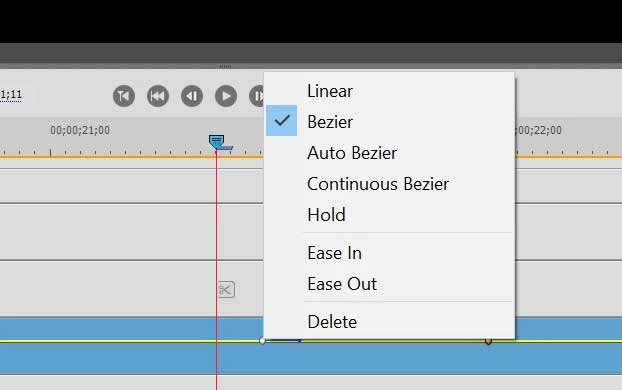
This function appears to be setup identical to Pro. But its not making any difference. After choosing both E IN and E OUT, no change. Am I missing something that must be enabled? I have tried the Bazier and Auto, etc.

    This topic has been closed for replies.

    7 replies

    StuMarksez
    Participating Frequently
    September 21, 2019

    Found the all important Show/Hide Button for Effects.

    Upper right hand corner is a tiny little bug that is actuall the effects icon. Clicking that opens the effects window that allows me to see everything I've been missing

    Peru Bob
    Community Expert
    Community Expert
    September 20, 2019

    Let us know what happens.

    StuMarksez
    Participating Frequently
    September 20, 2019

    And Bob, thx much for the navigation direction on this,, my first post in this forum. Clicking on Blue Reply.

    StuMarksez
    Participating Frequently
    September 20, 2019

    I may have figured out what I was doing wrong.

    Apparently, I may have been applying the Ein and Eout to the Location key frames instead of the Scale key frames. I am testing now, but I am seeing a whole 'nother lever of selecting that I missed. Due to differences from Premiere Pro I'm thinking.

    StuMarksez
    Participating Frequently
    September 20, 2019

    The Importance of working on larger monitors.


     Up in the top right hand corner of the Effects Panel is a tiny little bug that on normal sized screens is the Effects Icon. Clicking on this opens up the entire Effects Panel which displays all of the optiuons I've been missing.

    StuMarksez
    Participating Frequently
    September 20, 2019

    Typically, enabling 'IN or 'OUT on that menu which is accessible by right clicking on the key frames that show up after creating them, the hard start and stop defaults to a fairly smooth softer start and stop movement which can also be edited and tweaked even finer.


    Peru Bob
    Community Expert
    Community Expert
    September 20, 2019

    Can you show more screenshots showing the Effects panel and more of our timeline?

    Also, please use the blue Reply button insead of the other reply button:


    It makes it easier to follow and read the thread on this new forum format.


    Peru Bob
    Community Expert
    Community Expert
    September 20, 2019

    Can you show more screenshots showing the Effects panel and more of our timeline?

    StuMarksez
    Participating Frequently
    September 20, 2019
    Wow Bob!. You are just camped out on your keyboard. Thx much!