


Levalt
Inspiring
December 14, 2018
Question

Error creating BluRay ISO image file in PE 15

  • December 14, 2018
  • 5 replies
  • 1783 views

I quite unexpectedly ran into a problem that I have never experienced before: got an error message in the process of creating BluRay ISO image file.

This time it was 2-hour movie and the Burn In Progress process was running smoothly until it reached 97% point. When it reached 97% point it got back to 0% with the 'error' message in the left bottom part of the screen (see the image below)
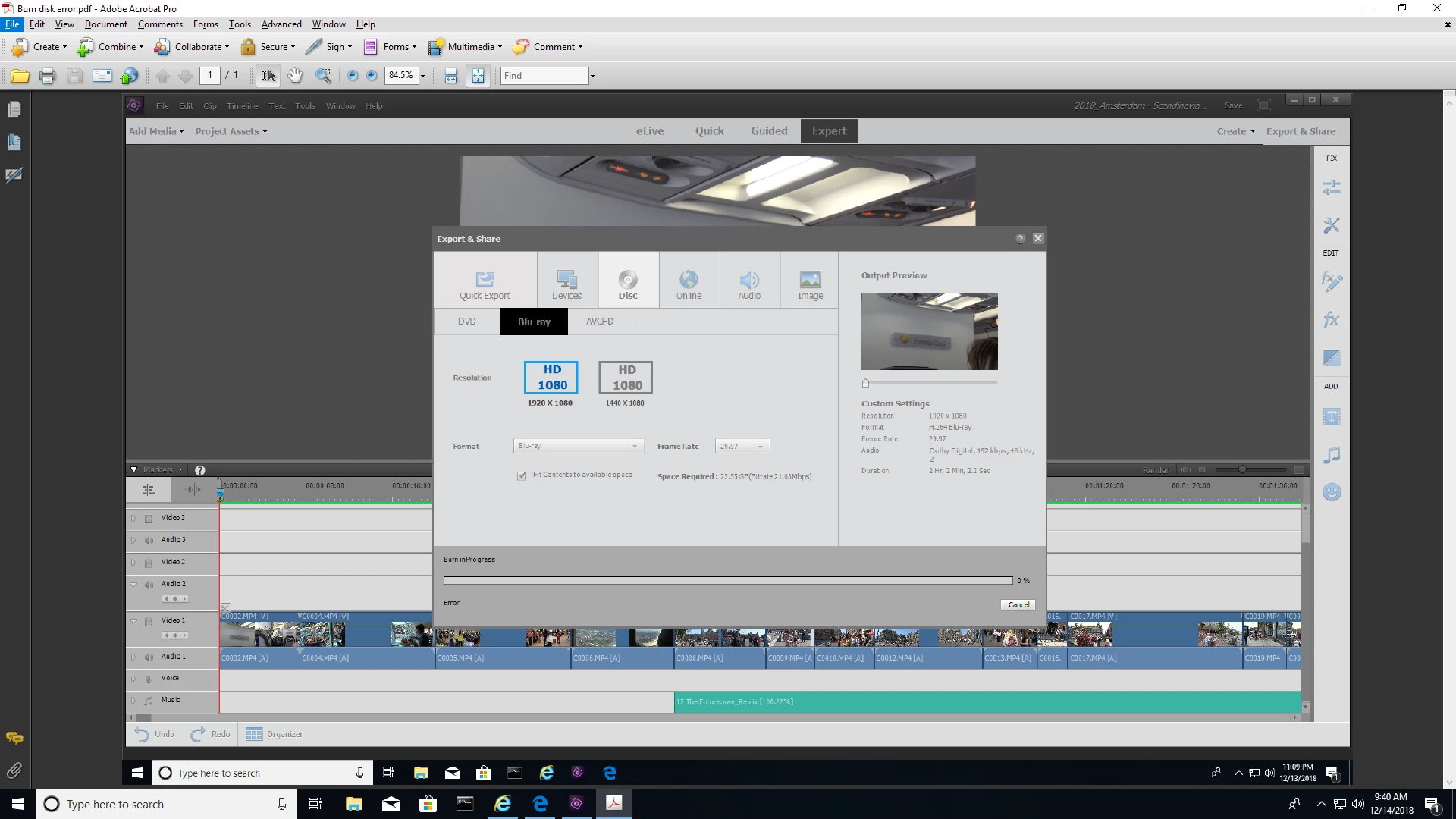
What IS going on?

Please HELP!!!!

Lev.

    This topic has been closed for replies.

    5 replies

    Legend
    December 17, 2018

    I'm no expert on Vimeo, but here's information for you.

    https://smallbusiness.chron.com/vimeo-duration-limits-70264.html

    There doesn't appear to be a duration limit for your videos. However, there is a limit to how much data you can upload, based on if you're using the free version or the paid version of the site.

    Legend
    December 16, 2018

    Only DVDs and BluRays have menus. You can save HD and even 4K videos to a thumb drive and play them on your TV -- but they won't have a DVD/BluRay style menu system.

    Levalt
    LevaltAuthor
    Inspiring
    December 17, 2018

    OK. What is the reason Adobe removed BD ISO/Burning from the Publishing in PE 2018 and PE 2019?

    I just checked the forum and it seems to me that PE customers are NOT happy about it.

    Is it still possible to create a menu in PE 2018 and 2019?

    Probably not since you can't see it anyway if you publish your project to a memory stick...

    In other words, it seems to me that PE 2018 and PE 2019 is a step back from PE 15 and basically it makes no sense for PE 15 users to upgrade to PE 2018 and PE 2019 since it is not a real upgrade, but downgrade.

    Am I correct in my assumption?

    I think that Adobe simply wants PE 15 users to upgrade to the Pro version, not to PE 2018 or 2019 if they really want a real upgrade...

    Do you agree?

    Lev.

    Community Expert
    December 17, 2018

    Lev,

    Users and, occasionally, Adobe programmers post here.  Corporate policy makers are light years away.

    Adobe chose to discontinue licensing everything in all apps regarding Dolby and AC-3 audio.  That includes Blu-Ray.  My guess is that it has to do with licencing agreements and costs. 

    Menus are for discs, DVDs and Blu-Rays.  In Windows you can still make menus for DVDs.  In Apples version 2019 no longer does Blu-Rays or DVDs. 

    In my view, and workflow, the world is moving to 4K, MP4s, YouTube and Vimeo.  Discs are becoming history.  So, yes, if discs are the core of your workflow, stick with version 15.   Any version upgrades would be a downgrade for you.  Is there anything you want to do and can't with version 15?

    Your assumption that upgrading to Premiere Pro is a sly Adobe goal does not hold water.  It doesn't do Blu-Rays any longer either.  There may be other reasons to upgrade, but disc burning isn't one of them.

    Legend
    December 15, 2018

    I look forward to hearing what happens when you  try my suggestion.

    Levalt
    LevaltAuthor
    Inspiring
    December 16, 2018

    Hi Steve, I was able to split the project in half and create ISO files. I also was able to create ISO file for the whole 2 hour project copying BD, that I was able to create through PE 15 using BurnAware  Free software. The size of the ISO file is roughly 24,000,000 KB. I had no problem creating this ISO file. So... PE15 can handle the direct creation of BD disc for big projects, but can't create ISO file. I assume there is a bug in PE15. Do you agree?

    By the way, I have your guide to PE 15 and like it very much. Would you recommend to upgrade PE 15 to PE 2019 in hope that it has less bugs and can handle big projects much better?

    Legend
    December 16, 2018

    I'm always careful about using the word "bug". I only use it if it's a universal issue and anyone can duplicate it. So whether or not there's an actual bug that's keeping you from creating a 2-hour BluRay is something for others to decide.

    As for later versions of the program, be aware that a few key features (including the ability to create BluRay discs) have been omitted from versions 2018 and 2019. So, if that's an important feature for you, I sure wouldn't upgrade.

    Nonetheless, thank you for supporting the books! I've been doing them since version 2, and it's nice to know that the books area really making a difference.

    That said, I don't know how far you want to dig into your BluRay issue. There are other experiments we can do to pinpoint the problem. But I think the simple answer is that 2 hours of video that may not match the project specs may be just too much for the program running on your computer to handle.

    Levalt
    LevaltAuthor
    Inspiring
    December 15, 2018

    I have around 285 GB of free hard drive space. I believe it is more than enough to create and save BluRay ISO image file on my hard drive. There was no pop-up error message notifying me reason the process is aborted. Just an error message as you can see in the image in my initial post. By the way, I was able to burn BluRay BD directly from the project and had no error messages.

    But my goal is to create BluRay ISO image file as I did for other projects and then burn BD using ImgBurn software. Unfortunately

    ImgBurn software is kind of limited and did not allow me to create BluRay ISO image file from BD.

    So... The question is still open: Why I had an error message while creating BluRay ISO  Image file for 2-hour project?

    Is in a bug in PE 15 that does not allow to create BluRay ISO  Image file for pretty big projects (running time 2 hours or more)?

    Lev.

    Legend
    December 15, 2018

    The longer your video, the more potential there is for things to go wrong.

    Make a copy of your project and in one of the copies cut away all but 20 minutes of your movie. Can you render it now?

    Also, can you output your 2 hour movie in any format? What happens if you export and share a 1920x1080 MP4 version of your movie?

    Meantime, as Bob says, your screen capture doesn't show enough of your timeline for us to see if there's a problem there. Close the Export & Share window and zoom back so we can see your entire movie on your timeline and post a screen capture of that.

    Levalt
    LevaltAuthor
    Inspiring
    December 15, 2018

    Hi Steve,

    Here Is the entire movie on the timeline:

    Do you see anything suspicious?

    Lev.

    Peru Bob
    Community Expert
    Community Expert
    December 14, 2018

    I can't read the error message.

    Do you have enough free hard drive space?

    Levalt
    LevaltAuthor
    Inspiring
    December 15, 2018

    I have around 285 GB of free hard drive space. I believe it is more than enough to create and save BluRay ISO image file on my hard drive. There was no pop-up error message notifying me reason the process is aborted. Just an error message as you can see in the image in my initial post. By the way, I was able to burn BluRay BD directly from the project and had no error messages.

    But my goal is to create BluRay ISO image file as I did for other projects and then burn BD using ImgBurn software. Unfortunately

    ImgBurn software is kind of limited and did not allow me to create BluRay ISO image file from BD.

    So... The question is still open: Why I had an error message while creating BluRay ISO  Image file for 2-hour project?

    Is in a bug in PE 15 that does not allow to create BluRay ISO  Image file for pretty big projects (running time 2 hours or more)?

    Lev.