


Participant
March 30, 2020
Question

Error while trying to archive project

  • March 30, 2020
  • 2 replies
  • 343 views

Hi there!


Title really says it all.


When I try to archive a complete project, elements proceeds to ca. 95% and then gives me this error message:
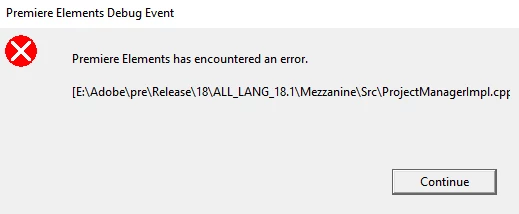


No idea what it means, but what I can say is that that file path does not exist on my computer.


Help would really be appreciated.

Thanks

This topic has been closed for replies.

2 replies

torstenw91301382
Participant
September 2, 2020

I have the same problem.

TebeAuthor
Participant
September 2, 2020

Hey, a reply! 🙂


After lots of trying around I found that the problem was related to the names of video or music files used within the project to be archived.


Certain characters seem to confuse Premiere and after tediously renaming my files it suddenly worked.


So make sure the names of your video and sound snippets don't contain unusual characters (&,@, ä, ü, ö, §, ß, #...).

Should work then (at least in did in my case).


Regards,

Tebe


TebeAuthor
Participant
March 30, 2020

PS: Version is Premiere Elements 2020