
Participant
September 3, 2022
Answered

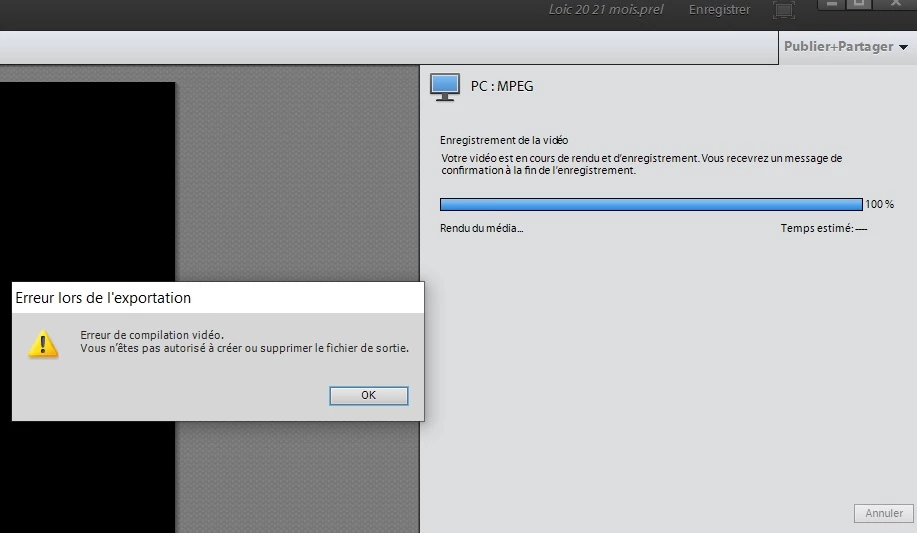
Export video "Video compilation error". - Exporter la vidéo "Erreur de compilation vidéo"

  • September 3, 2022
  • 1 reply
  • 285 views

English (français en dessous)

I am using Adobe Premiere Elements on Windows 10.
I want to export my movie. I go to Publish > on a Computer > MPEG. When I click Save; I immediately get the following error:
"Video compilation error.
You are not allowed to create or delete the output file".

What is the problem?
I tried to delete all the preview files (in Adobe Premiere Elements Preview Files, Layouts and Encoded Files directories. I kept the ones from Auto Save), it didn't help.

Thanks for your help !
Français:

J'utilise Adobe Premiere Elements sur Windows 10.
Je cherche à exporter mon film. Je fais Publier > sur un Ordinateur > MPEG. Quand je clique sur Enregistrer; j'obtiens aussitôt l'erreur suivante:
"Erreur de compilation vidéo.
Vous n'êtes pas autorisé à créer ou supprimer le fichier de sortie".

Comment faire ? Quel est le problème?
J'ai essayé de supprimer tous les fichiers de prévisualisation (dans les répertoires Adobe Premiere Elements Preview Files, Layouts et Encoded Files. J'ai gardé ceux de Enregistrement automatique..)

Merci de votre aide pour me débloquer!

This topic has been closed for replies.
Correct answer Alice23741050ywk3

Hi,


I finally found the issue!

I changed the rights on the directory where I export the video. I put

attrib -r +s "mon répertoire" /S /D


... and it's ok!!

thanks again for your help

1 reply

John T Smith
Community Expert
Community Expert
September 3, 2022

An idea that MAY help what seems to be a permission problem

RIGHT click the program icon or EXE and select Run as Administrator to assign FULL Windows permissions
-also https://helpx.adobe.com/x-productkb/global/create-local-administrator-account-windows.html

Participant
September 4, 2022

Hello,

Thank you for helping me!

I tried both ideas:

- run the program as Administrator --> same problem

- create a new local administrator account, then log in and run the program -> same problem.


What can I do to solve the problem and get my video?

Thank you very much

Alice23741050ywk3AuthorCorrect answer
Participant
September 4, 2022

Hi,


I finally found the issue!

I changed the rights on the directory where I export the video. I put

attrib -r +s "mon répertoire" /S /D


... and it's ok!!

thanks again for your help