


Feature request for Premiere Elements
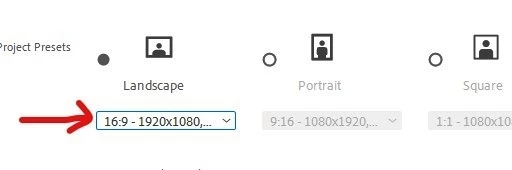
I want to report a design issue in Premiere Elements 2024 that occurs when creating a New Project.The Problem: In the "New Project" dialog, the preset box only displays 16:9 - 1920x1080
Since these values match most users' needs, they are accepted immediately. However, the interface hides the most critical information: the frame rate (29.97 fps )
It is very easy for a user to overlook that this is actually a dropdown menu. By accepting the visible values, they unknowingly agree to a 29.97 fps project, which is incorrect for those of us filming at 25 fps (the standard in Europe).
Because Premiere Elements doesn't allow copying tracks between projects with different frame rates, this lack of transparency at the very start of the workflow forced me to restart hours of work from scratch.
The Suggestion:
Please, make the Frame Rate visible at first glance in the New Project window so users don't unknowingly accept an incorrect default. I urge you to take this into account for future versions of the program to prevent more users from losing their time and work.
Remember : Premiere Elements is also used by European users.

 AdChoices