



For Steve G.: Added Moving Line to Map in PE14 but Transition Interferes
This one is for Steve...
PE14 on a WIN7 PC.
I'm putting together a short vacation video mostly with slides and with just one video clip taken with a phone phone (Samsung). I'm at the start of this project.
I added this video clip as the first item to the project & then added a number of photographs.
As an intro I show the route flown & did this based on what Steve shows here:
Add a moving line to a map in PE 14:
https://www.youtube.com/watch?v=hUPpc7RUAJ8
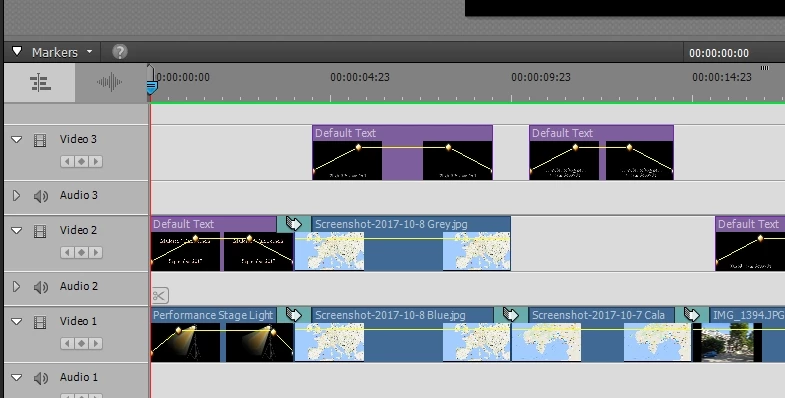
I placed the graphic with the route in Blue into Video 1 & Grey into Video 2.
This works well. The clips with the maps are 6 seconds long and
is preceeded by 4 seconds "Stagelight". Above "Stagelight" is "Default text"
for exactly the same length - both Video 1 & 2 have fade-in & out applied.
I exported the video as I would for YouTube: Devices / TV & HD 1080 (about 64MB in size):
https://www.dropbox.com/s/rwn79nrzsnh089l/CalaFornells-2017-NOXD.mp4?dl=0
Because the change from "Stagelight" to the map with the route flown is
rather abrupt I added a transition (cross-disolve) for 1 second between
the "Stagelight" & the Blue route map, I did the same on Video 2 between
the Default Text and the Grey route map. See timeline:
When previewing (& playing this exported video) some strange things happen.
- Instead of the flight route being all grey & "moving" from top to bottom into blue it starts off blue, fades to grey & then transitions to blue from the top (this as it should).
- At the same time the top inch or so of the entire screen (map) is partialy greyed-out before reaching full intensity.
See: https://www.dropbox.com/s/vubm7bbuhewpi6k/CalaFornells-2017.mp4?dl=0
Clearly somehow the transition is interferring. Any ideas?
HEM
 AdChoices