


Participant
April 21, 2021
Question

Freeze frame stills are blurry and rendering blurry video.

  • April 21, 2021
  • 3 replies
  • 451 views

I just upgraded to the latest version of Adobe Premiere elements 19.0 and the rendering is blurry.  The video have been inconsistently blurry and I can't seem to figure out the cause. I am capturing video using a Hero8 GoPro in 2.7k with 60 fps and I seem unable to render it to 1080p in Adobe Premiere Elements.  Any help would be greatly appreciated.  

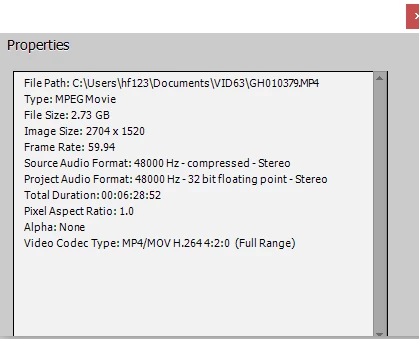
Original files.
 

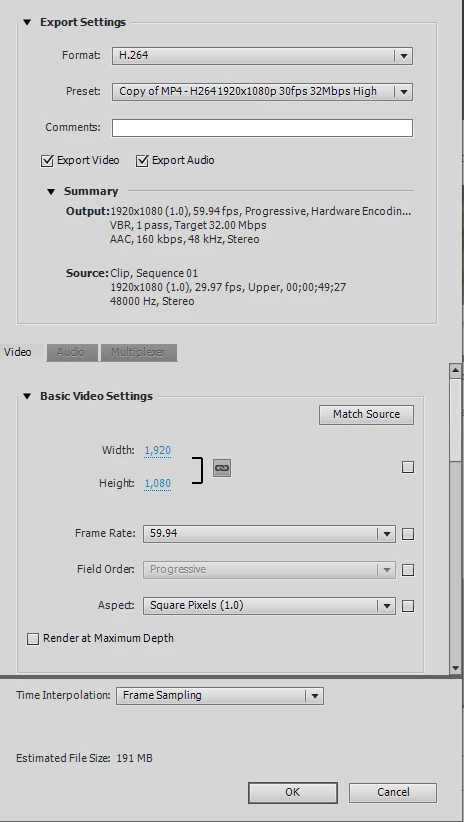
Export settings


This topic has been closed for replies.

3 replies

Ann Bens
Community Expert
Community Expert
April 21, 2021

Your settings are wrong.

Project should be 60 fps progressive (59,94)

As of now the project is set to interlaced 29,97 (upper).

Post screenshot clip in treeview by using Mediainfo.


MediaInfo windows

Community Expert
April 21, 2021

Help me out Ann!  Where did you spot "interlaced".   I missed it.

Ann Bens
Community Expert
Community Expert
April 21, 2021

Upper?

Community Expert
April 21, 2021

"inconsistently blurry".  


Your settings seem right.  How are you viewing the output?  Are there clips that consistantly are not blurry?  Can you post examples.  With what you've given, it is hard to guess at answers. 

Lee5C60Author
Participant
April 21, 2021

Smart trim setting of action rather than people seem to make the blurriness better.  Not sure if the render will be better, but so far seems to be better.  Fingers crossed!!