


Question
GPU shows unsupported even though it is in the list
I have an NVidia GEForce GTX 1060 6 GB GPU. The GPU shows up as being supported on the list here:
https://helpx.adobe.com/premiere-elements/using/gpu-acceleration.html#recommended_cards
However, in Premiere Elements 2021 when I go to Preferences->General, the detected graphics processor is correctly identified as the GTX 1060, but it states that it is unsupported.
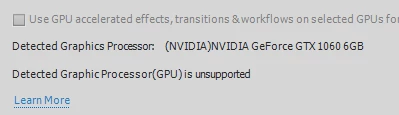
I'm running Windows 10 21H1 and have updated my Nvidia drivers to the latest version.
I tried contacting support and they walked me through that is clearly a generic debugging list:
- Delete the preference files for Premiere Elements
- Make sure that the program folders had read/write permissions
- Double check my computer's capabilities (i7-7700 with 32 GB)
I'm running on a local admin account. I gave up when they tried getting me to create a new local test account on Windows afte I spent an hour with them.
I'm open to other suggestions.
Carlos


 AdChoices