


Participant
February 16, 2021
Question

Green and pink videos in Premiere Elements

  • February 16, 2021
  • 3 replies
  • 839 views

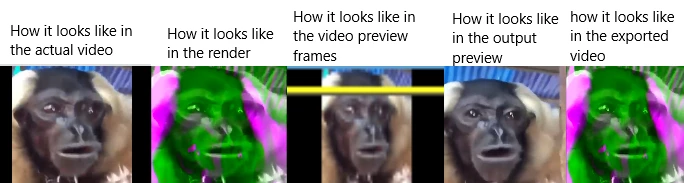
I already have tried updating my drivers, but it says up to date. I have tried uninstalling and re-installing them, but no avail. I seem to be very confused, as this happens with every .mp4 video (short and long) and every .mov file i had. If someone could help me, i'd be very thankful 🙂 .

The image i have added shows my problem.
This topic has been closed for replies.

3 replies

Community Expert
February 21, 2021

Ju5c23,


That icon will be in the lower right corner of your screen.  It "floats" meaning is stays in that position even when you scroll through the webpage. 


Participant
February 22, 2021

Yes ! Actually, it was my explorer that blocked the chat icon (one of these anti-popups walls, I guess).

Tried in another Internet explorer and got the icon.

Thanks !

As soon as I get a free minute to work on my Elements issue, I will consult this help and hopefully manage to solve the problem.


Community Expert
February 16, 2021

Frederik,


You didn't say what version of Premiere Elements you have.   Sometimes it is necessary to "roll back" the video driver.   


If you have the newest version, there is online help from Adobe techs to help.


Participant
February 20, 2021

Hi,

I've got the same problem : installed Adobe Premiere Elements and get all my videos imported with these pink and green bad images.

I transcoded videos in different codecs but still...

Graphic card drivers are up to date.

I don't know what to do next. I bought the Premiere Elements in September and am still not able to use - it's getting long...

You say " there is online help from Adobe techs to help" : where ?!

Please, help...


Thanks


Peru Bob
Community Expert
Community Expert
February 20, 2021


You say " there is online help from Adobe techs to help" : where ?!

Please, help...


By @Ju5C23

Adobe Customer Service:
https://helpx.adobe.com/contact.html?step=STAM_downloading-installing-setting-up_serial-numbers-rede...

You may also be able to contact Adobe by phone:
https://helpx.adobe.com/contact/phone.html


John T Smith
Community Expert
Community Expert
February 16, 2021

>tried updating my drivers, but it says up to date


Do not count on Windows to be fully up to date when it comes to device drivers
Go to the vendor site to be sure you have an updated driver for your graphic adapter
•nVidia Driver Downloads http://www.nvidia.com/Download/index.aspx?lang=en-us
••for Premiere Pro and MAYBE Premiere Elements use the STUDIO driver, not the GAMING driver
•••such as https://www.nvidia.com/en-us/drivers/results/170344/
•ATI Driver https://www.amd.com/en/support
There are also intermittent reports that the newest driver is not always the best driver due to driver bugs or compatibility issues, so you MAY need to try an earlier driver version