
Inspiring
December 7, 2022
Answered

Green & fushia on video preview in PE 2022

  • December 7, 2022
  • 3 replies
  • 671 views

Hello,

I bought and installed Premiere Elements 2022, which I've been using without any problem for a few months.

Since a few days, when I import a video from my camera, the same one I've been using for months, the preview of the video appears in green & fushia.
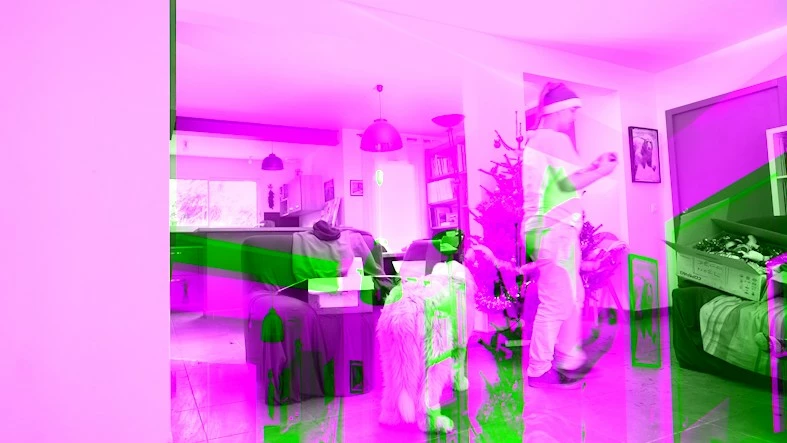


So I can't edit it.

On the same computer, I still have the version of PE 12, which works fine though, so I guess it's not a hardware or driver problem

I can't figure out which setting was changed, and I can't reset the settings either.
I even uninstalled and reinstalled PE 2022, but that didn't fix the problem.

Can anyone help me?

Thanks by advance

This topic has been closed for replies.
Correct answer John T Smith

Every time you allow a Windows update you run the risk of video problems


Do not count on Windows to be fully up to date when it comes to device drivers
Go to the vendor site to be sure you have an updated driver for your graphic adapter


nVidia Driver Downloads https://www.nvidia.com/Download/index.aspx?lang=en-us
-for all Adobe programs use the STUDIO driver, not the GAMING driver
-To achieve the highest level of reliability, Studio Drivers undergo extensive
-testing against multi-app creator workflows and multiple revisions of the top
-creative applications from Adobe to Autodesk and beyond


If you have a laptop you MAY also need to check for a laptop specific nVidia driver
-SOME laptops require an approved driver from the laptop company, not nVidia


AMD/ATI Driver https://www.amd.com/en/support


Intel https://downloadcenter.intel.com/product/211969/Intel-HD-Graphics-Family

3 replies

Peru Bob
Community Expert
Community Expert
December 8, 2022

Try contacting Asus about video drivers.

Your issue is almost always a graphics card or driver issue.

Inspiring
December 8, 2022

OK, I'll try this
Because I just installed the 517.40 studio driver, but it still doesn't fix the issue..

Thanks everybody for your help.

John T Smith
Community Expert
Community Expert
December 8, 2022

You have TWO devices... Intel and Nvidia

Did you update the Intel device per the link I posted?

Which one is your computer using?

Peru Bob
Community Expert
Community Expert
December 8, 2022

. If NVIDIA, do a clean installation of the 517.40 Studio Driver (NOT the Game Driver)

Inspiring
December 8, 2022

Hello Peru Bob and everyone,
I updated the graphics card driver using the NVIDIA utility (because I could not find the right driver on the NVIDIA website),
Via the utility, I chose the studio version of the driver (and NOT gaming)
.... but unfortunately the problem is still not solved...

I don't know what to do anymore, unfortunately....
If someone has another idea ???
The software is currently unusable, which is a shame.
Thanks to you for your suggestions.

Inspiring
December 8, 2022

And.. I confirm that the old version of Premiere Elements (2012), works
But the new version '(2022) doesn't...
... strange situation 😉

John T Smith
Community Expert
John T SmithCommunity ExpertCorrect answer
Community Expert
December 7, 2022

Every time you allow a Windows update you run the risk of video problems


Do not count on Windows to be fully up to date when it comes to device drivers
Go to the vendor site to be sure you have an updated driver for your graphic adapter


nVidia Driver Downloads https://www.nvidia.com/Download/index.aspx?lang=en-us
-for all Adobe programs use the STUDIO driver, not the GAMING driver
-To achieve the highest level of reliability, Studio Drivers undergo extensive
-testing against multi-app creator workflows and multiple revisions of the top
-creative applications from Adobe to Autodesk and beyond


If you have a laptop you MAY also need to check for a laptop specific nVidia driver
-SOME laptops require an approved driver from the laptop company, not nVidia


AMD/ATI Driver https://www.amd.com/en/support


Intel https://downloadcenter.intel.com/product/211969/Intel-HD-Graphics-Family

Inspiring
December 7, 2022

Thanks a lot for your quick and complete answer...
I'll try to look to the driver...
Could it be possible that the same driver works in PE 12 but not on PE 2022 ??

I use a laptop...
I'll get some help, I'm not very comfortable with the drivers updates 🙂

Anyway, thanks for your answer, I'll get back as soon as it is fixed

Community Expert
December 7, 2022

Yes it is not possible, but probable that the video drivers in place when version 12 was coded are different that for version 2022.  

There is no reason to be uncomfortable with driver updates.  What are the details of your computer?  Does it have an Nvidia GPU?