


GTX 1060 not supported
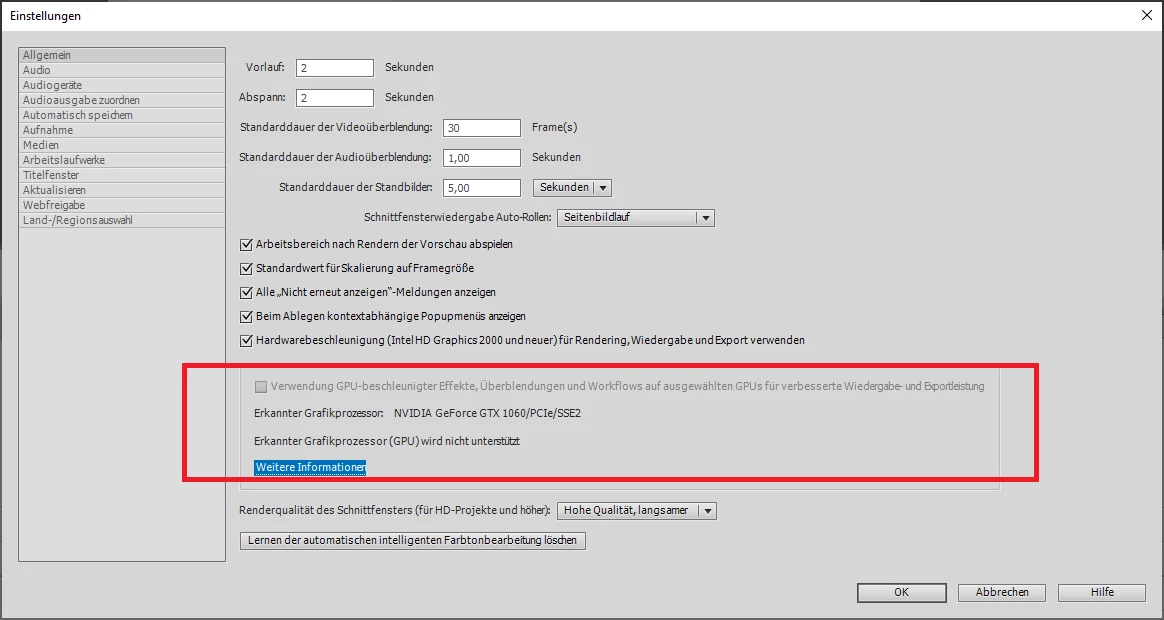
Hello,
Running PE21. I can not select hardware acceleration using the GTX 1060 6GB of my system. The option stays greyed out. Tried driver versions: 399.24 - 416.94 - 425.31 - 461.40 - 466.27 - and the latest studio driver from nvidia. The option does not unlock. PE21 20210127 223
C:\Program Files\Adobe\Adobe Premiere Elements 2021>GPUSniffer.exe
GPUSniffer testing 254
Initializing GPU Tech:
Try CUDA: 1
Try OpenCL: 1
Try Metal: 1
Try Vulkan: 1
KernelLoadAction: 0
UseOpenGLContext: 0000000000000000
UseDeviceContext: 0000000000000000
UseD3D11Context: 0000000000000000
CUDA system device count: 1
Found CUDA device index: 0 Name: GeForce GTX 1060
No capability restrictions detected - adding device to list
OpenCL system device count: 1
Found OpenCL device Name: GeForce GTX 1060 supportsSSG: 0
Skipping nVidia OpenCL device
Finished gpu initialization in 0 ms
--- OpenGL Info ---
Vendor: NVIDIA Corporation
Renderer: GeForce GTX 1060/PCIe/SSE2
OpenGL Version: 2.1.2 NVIDIA 461.40 27.21.14.6140
GLSL Version: 1.20 NVIDIA via Cg compiler
Monitors: 3
Monitor 0 properties -
Size: (0, 0, 3440, 1440)
Max texture size: 32768
Supports non-power of two: 1
Shaders 444: 1
Shaders 422: 1
Shaders 420: 1
Vendor: NVIDIA Corporation
Renderer: GeForce GTX 1060/PCIe/SSE2
OpenGL Version: 2.1.2 NVIDIA 461.40 27.21.14.6140
GLSL Version: 1.20 NVIDIA via Cg compiler
Monitors: 3
Monitor 1 properties -
Size: (-1440, -2133, 1440, 2560)
Max texture size: 32768
Supports non-power of two: 1
Shaders 444: 1
Shaders 422: 1
Shaders 420: 1
Vendor: NVIDIA Corporation
Renderer: GeForce GTX 1060/PCIe/SSE2
OpenGL Version: 2.1.2 NVIDIA 461.40 27.21.14.6140
GLSL Version: 1.20 NVIDIA via Cg compiler
Monitors: 3
Monitor 2 properties -
Size: (3440, -449, 3240, 2160)
Max texture size: 32768
Supports non-power of two: 1
Shaders 444: 1
Shaders 422: 1
Shaders 420: 1
--- GPU Computation Info ---
Found 1 devices supporting GPU computation.
CUDA Device 0 -
Name: GeForce GTX 1060
Vendor: NVIDIA
Capability: 6.1
Driver: 11.2
Total Video Memory: 6144MB


 AdChoices