


Known Participant
February 14, 2020
Question

Having to IMPORT video clips every time I open PSE 13

  • February 14, 2020
  • 1 reply
  • 499 views

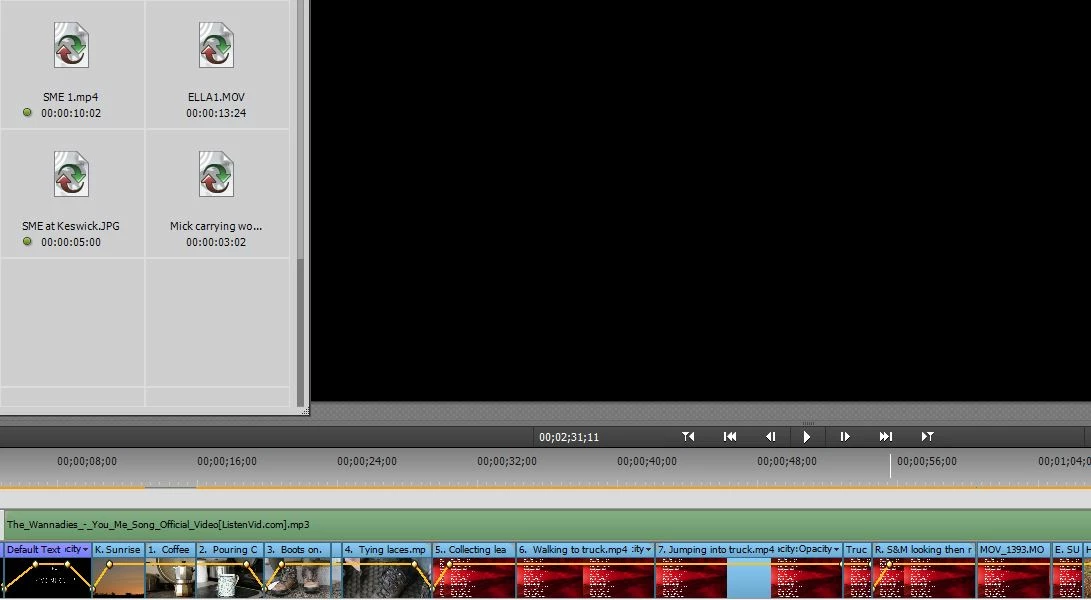
Everytime I open Elements 13 I'm having the same problem - previous clips are not showing, despite me saving as I'm going along.
I click on the greyed out squares on the left and then have to re-import the clip from the folder.
Everything is on a hard drive.
What am I doing wrong ?

Thanks


This topic has been closed for replies.

1 reply

Community Expert
February 14, 2020

I'm sure you know this.....  The imported clips are not "in" the project.  Adding media only references the clip in its location.  The links to the files are being broken somehow.  Where are the clips?  Are they on the drive with the project?  Are they still on the camrea?  Are they on an external drive? 

pfmarconiAuthor
Known Participant
February 15, 2020

Originally I had them on an external hard drive but recognised that as being a/the problem.

I therefore put everything onto one of my two hard drives and started again, but I'm having the same problem. I've clicked on auto saves but no clips are showing from there either.
At the moment I would need to make the video in one go which is not really feasable. 
Thanks