



Question
HELP - Export Settings for Good Quality/Smaller File Size
New to this so be kind.
I'm trying to export video for use on YouTube but the file size is too large for my internet to upload quick enough. I'd like to have a more managable file size but I'm unsure if I'm doing something wrong.
I'm using Adobe Premiere Elements 18 on Windows 10 (64-bit)
The file I am uploading into Elements is a wmv. file at 146mb, see screenshot for more specs.
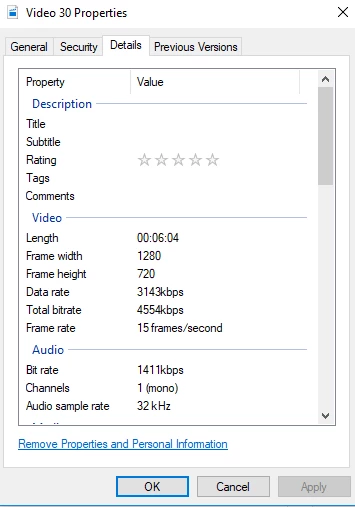
What is the best export settings for this? The default export settings jack the size up to 450mb+ and I've been unable to get this size down. What project settings should also be selected when starting the project? Any help is appreciated.


 AdChoices