


rebeccalNR
Participant
February 27, 2019
Answered

How do I add a background colour to captions in Premiere Elements 13?

  • February 27, 2019
  • 1 reply
  • 1505 views

Hi there!  There are loads of videos on how to add a title text etc. but I want to add a background colour to my subtitles / captions and I can't find anything on how to do this.  I'd like this to be a gradient / a bit transparent so you can see the video behind the colour.  Other programmes seem to offer this, but I'm struggling to see how to do this.  Please can someone help?!
    This topic has been closed for replies.
    Correct answer Bill Sprague

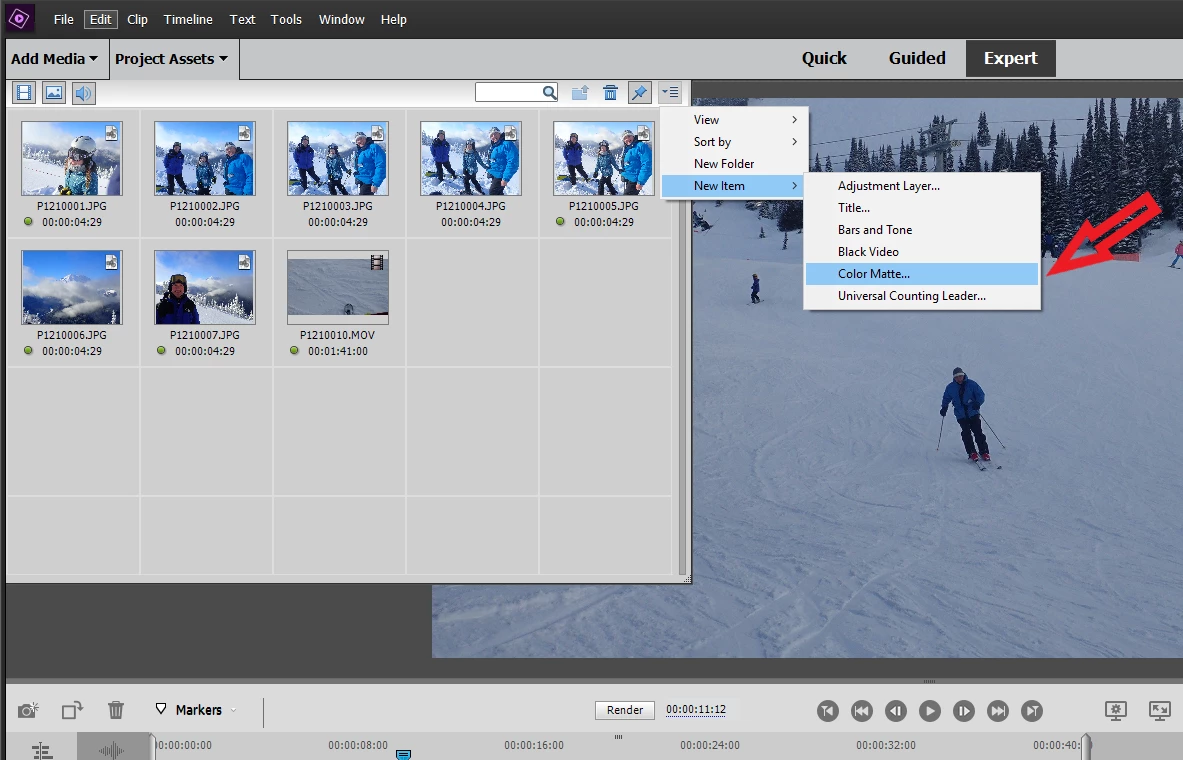
    The basic techique is to put your background on video track 1 and the content like a title above it on video track 2.  The background can be any image file you find or create.  In Premiere Elements you can create a "Color Matte" for that background.

    1 reply

    Bill SpragueCommunity ExpertCorrect answer
    Community Expert
    February 27, 2019

    The basic techique is to put your background on video track 1 and the content like a title above it on video track 2.  The background can be any image file you find or create.  In Premiere Elements you can create a "Color Matte" for that background.

    rebeccalNR
    Participant
    February 27, 2019

    Thank you so much for getting back to me. I’ve followed your instructions and think I’ve got it now. Thanks again!