
Participant
June 2, 2017
Answered

HOW DO I CHANGE THE BACKGROUND COLOR Black to White?

  • June 2, 2017
  • 2 replies
  • 6067 views

This is related to the use of ADOBE Premiere ELEMENTS (14.0).

On play back I notice that I wanted to have the background option to change it from black to white since I am placing various small clip on the stage which black does not work for me. So, how do I change the black backdrop stage (when the video plays) to white backdrop stage so when it plays back the scene is white and not black?

    This topic has been closed for replies.
    Correct answer williebegoode

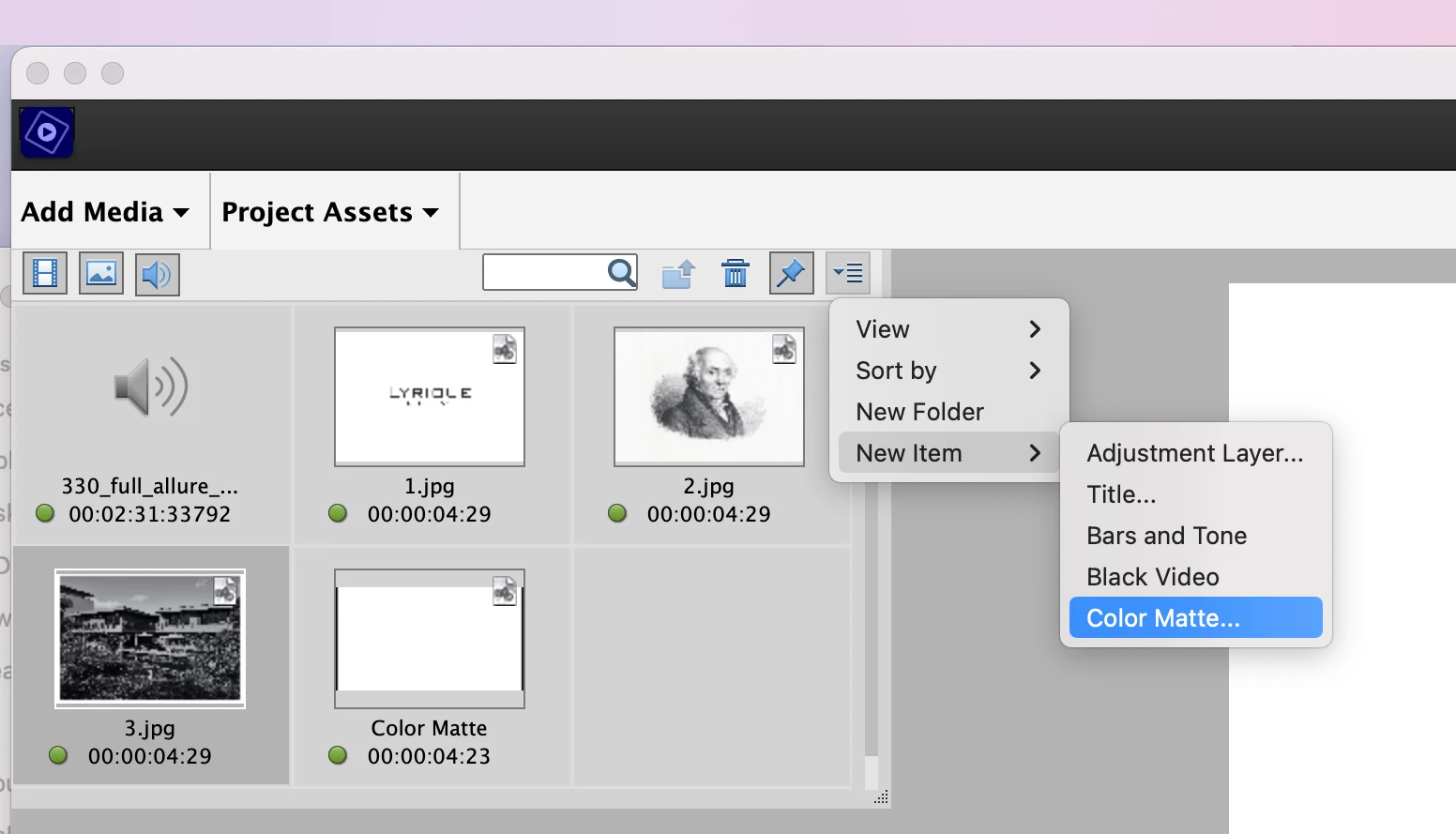
    Peru Bob's reply is the right one. The only problem is that finding the cubby hole where mattes are accessed can be tricky...from the Expert Mode open Projects Assets -> and go to the last item in the menu bar-> New Items -> Color Mattes


    2 replies

    Peru Bob
    Community Expert
    Community Expert
    June 2, 2017

    The black background is actually just transparency.

    Use Expert Mode and create a white matte and place it on a video track below your video.  In other words: Wnite matte on Video 1,  tour video on Video 2.

    See here:

    Adobe Premiere Elements Help | Creating specialty clips

    williebegoode
    williebegoodeCorrect answer
    Participating Frequently
    May 27, 2022

    Peru Bob's reply is the right one. The only problem is that finding the cubby hole where mattes are accessed can be tricky...from the Expert Mode open Projects Assets -> and go to the last item in the menu bar-> New Items -> Color Mattes


    Barb Binder
    Community Expert
    Community Expert
    June 2, 2017

    Hi sr78. You posted your question in the non-technical Lounge forum, which is where you can connect with your peers for conversations that don't directly relate to product help and support. I’ll move your question to the Premiere Elements forum so that you can get the answer you are looking for.

    ~Barb

    P.S. For a list of all available product forums, see https://forums.adobe.com/welcome/

    ~Barb at Rocky Mountain Training